

Bad leads can throw off the accuracy of your pipeline forecasts and send your best reps chasing down false trails. With B2B contact data decaying at 22.5% every year, that means nearly a quarter of your CRM can go stale behind your back, increasing bad leads. You need the five-step process shared in this guide to find, clean, and prevent them from wasting time and resources.
Contents
Bad leads are one of the biggest headaches for your sales pipeline. Sales reps spend 27.3% of their workday (approximately 546 hours/year), chasing unqualified contacts, fixing bad information, and pursuing deals that will not close. This is not a productivity problem. Instead, it is the problem of your data.
There is a predictable root cause; B2B contact records decay at about 22.5% per year. Employees get new jobs, companies reorganize, e-mail addresses expire. With no structured process of cleaning the data, the bad information moves through your pipeline without being checked for accuracy and inflates your forecasted closing rates while wasting your reps’ time. As a result, sales lead cleansing is very crucial.
This guide describes how to determine if there are bad sales leads in your pipeline that need to be removed and provides the exact same 5-step data cleansing process we used for our clients, including a B2B data aggregator managing 50 million records and a video communication company that has customer profiles of 120,000 needing enrichment.
The Real Cost of Bad Sales Leads
The monetary impact of having bad lead data is quantifiable. On average businesses lose $5 million annually due to low-quality data (IBM). And a CRM of 50,000 contacts, considering 22.5% annual degradation, loses approximately 11,250 records to staleness per year.
At a conservative price tag of $50 pipeline value per lead, that means $562,500 in lost revenue not because of bad sales performance, but because of spending time to contact people who have already left.
In terms of lost time, the number is also quantifiable. According to a report, the average time spent on bad data-related activities for a rep is 546 hours/yr. For a 10-person sales organization, this equates to more than 5400 hours/yr nearly three full-time employees’ worth of lost sales time all spent on doing things other than selling because of poor data maintenance.
For businesses in rapidly changing markets, the amount of money lost due to CRM degradation increases significantly. Because annual CRM degradation can be as high as 70% in many cases. When a database is not regularly cleaned, it does not remain static, and it degrades.
On this point, the IBM Institute for Business Value (IBV) claims that 43% of chief operations officers say data quality issues are their topmost data priority.
This creates an operational challenge: inaccurate sales forecasting based on data. When a large percentage of records in your CRM are stale, then the numbers used to create revenue forecasts are inherently unreliable.
What Are Bad Sales Leads? (And Why They Keep Appearing)
A bad sales lead is any contact in your CRM or lead database that has little or no chance of becoming a paying customer. Stale contact information, mis-identified firmographics, duplicate records, or contacts that don’t meet your ideal customer profile (ICP) constitute a bad sales lead.
Your ICP is the definition of the company and buyer types that represent the highest likelihood of conversion and retention determined by characteristics like industry segment, company revenue range, employee count, and title of decision-making personnel. You need to purge from your active pipeline any lead that doesn’t fit these definitions, regardless of the data source.
Data degradation leads to continuous additions to the pool of bad leads in your database.
Degradation represents the continuous process that generates bad leads. Data degradation is not just once-off data quality issues, it is a continuous process. Employee titles change after promotions or restructuring. Emails are rendered invalid when employees depart. Companies rebrand as part of acquisition activity. Telephone numbers are reassigned. Therefore, at an annual degradation rate of 22.5%, a CRM database becomes less accurate by approximately one-quarter of its original content each year.
The rate of degradation varies: higher-level contacts in high turnover sectors degrade at a greater rate than middle market contacts in non-changing markets.
Is bad data quietly inflating your pipeline forecasts?
Request a data cleansing quote »6 Early Warning Signs of Bad Sales Leads (Before They Enter Your CRM)
There are 6 indicators which show that a lead will most likely be unable to complete their conversion. Identifying the reasons why this will happen sooner rather than after an SDR has spent time on discovery calls.
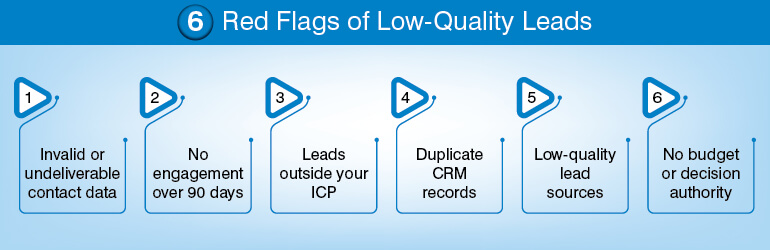
1. Hard-bouncing or undeliverable contact information
Non-deliverable email addresses produce a 550 or 551 SMTP error codes, indicating that those email addresses do not currently exist. Similar issues occur with phone numbers which have been either “disconnected” or changed to another person’s name. These are data integrity issues, not retrieval issues. Identify and mark these records for validation or deletion when detected initially. Do not wait until the next quarterly review.
2. Zero engagement over 90 days
Any Contact who has shown zero engagement over a period of 90 days has clearly indicated little to no purchase intent. All Marketing Automation Platforms such as HubSpot, Marketo, Pardot, etc., measure engagement through a composite score. A contact who shows no movement in his/her engagement score over a period of 90 days is an indicator, but may not warrant re-qualification prior to advancing further down the sales pipeline.
3. ICP mismatch
A lead who is identified as being outside of your defined Ideal Customer Profile based upon job function, industry, or Company Size, should not be entered into the sales cycle regardless of where they were generated from. The cost of qualifying out a lead immediately upon entering the system is one single data check. The costs associated with qualifying out a lead after three Rep interactions include three calls, 1 proposal draft, and lost forecast time.
4. Duplicate records
Duplicates within the CRM of the same Contact represent multiple histories for activity tracking, conflicting ownership assignments and duplicate efforts for outreach. When Two Reps pursue the same lead from separate CRM Records, neither rep has all the facts. Schedule Deduplication as a recurring Process in your System and not manually perform it due to visibility of a known issue.
5. Low-quality or unverified lead source
Leads derived from Purchased Lists, Scraped Directories and Syndication Networks lacking sufficient qualifications also have a greater propensity for poor-quality data. Assess each lead source based upon historical conversion rates from lead-to-opportunity.
If you have a source providing high volumes of Leads, however only converting 2%, then that source is generating more bad Leads than good ones. Remove this source from your system or re-qualify this source output prior to allowing it into the sales Pipeline.
6. No verified budget or purchasing authority
A contact demonstrating real interest in products/services offered by your organization, however, lacks the authority to make purchasing decisions and/or confirm whether there exists an allocated budget for said purchases will not progress beyond the Evaluation Stage.
Verify budget and authority at the time of lead capture and not mid-cycle. The verification criteria belong in either your Lead Intake Form or your SDR’s first touch script, not in a deal review six weeks later.
The 5-Step Bad Sales Lead Cleansing Process (With Real Client Examples)
The most effective method to clean your sales leads is through a five-step data cleansing process. Each step builds on the previous. While each step may be performed separately, the result of each step must be present before moving on to the next.
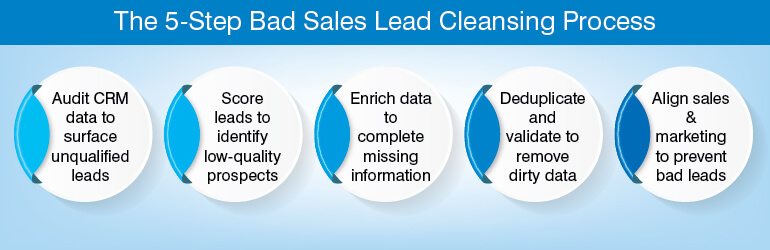
1. Run a CRM data audit to surface unqualified leads
A systematic audit of your CRM or lead database involves reviewing your entire database and focuses primarily on identifying those records that contain incorrect / bad information. The purpose of an audit is not to fix the problems; rather, it is used to identify which records need to be corrected/deleted. The findings of the initial audit will serve as the basis for the remaining data cleansing process.
Conduct the audit in three phases:
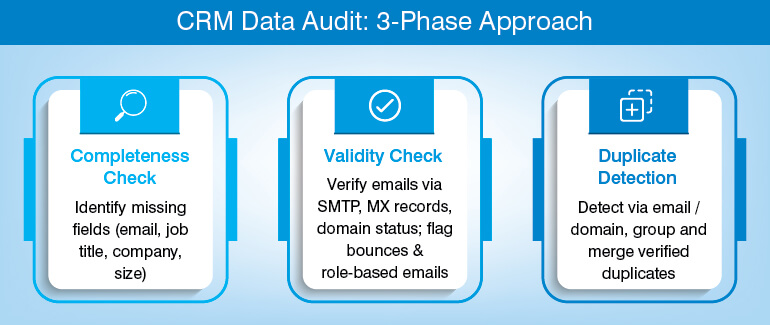
- Completeness check: Review your database for completeness by checking to see if any records are missing the required fields. Some examples of common incomplete fields are email address, job title, company name and company size. Records that lack complete information cannot be thoroughly evaluated for routing purposes.
- Validity check: Verify the validity of the email addresses contained in your database using email verification software. The software verifies SMTP response codes, MX record status and active domain status. Identify ‘hard’ bounce emails (those returned by ISPs) and ‘role’ based emails (such as info @ or support @) that indicate a lead is either not validated or should be assigned to another contact within the same organization.
- Duplicate detection: Run a duplicate detection scan that utilizes the email address and/or company domain as its primary matching criteria. Group suspected duplicates together and manually review them prior to merging into a single record.
Client Example
We were hired by a B2B data aggregator who was responsible for managing a database containing 50 million business records. Due to rapid degradation in their database quality, they needed help. We used automated rule-based validation and batch processing along with manual research to continually validate and correct their database.
Ultimately, our services produced a highly accurate database that could be used to support large-scale real-time prospect queries at the level of enterprises. Instead of maintaining a static list that continuously deteriorates between refresh cycles, they now maintain a continuously updated verified record base.
To read more about this case study visit: B2B data aggregator – database validation & enrichment
Pro Tip: Schedule data audits at least once every quarter. If you do not schedule a data audit during any given quarter, your data degrades at a rate of approximately 5–6%. Larger databases with constant lead flow (> 20k contacts) may benefit from adding real-time email validation on form submissions to minimize the amount of auditing necessary.
Auditing determines what you currently have. The remaining task is determining how much of it you will keep.
2. Create a lead scoring system to identify poor quality leads
Lead scoring is a number-based system of evaluating how well a contact matches your Ideal Customer Profile (ICP) and has interacted with your content. This system is what qualifies or filters out your leads before sending them to the sales queue.
A successful lead scoring model is based on two dimensions:
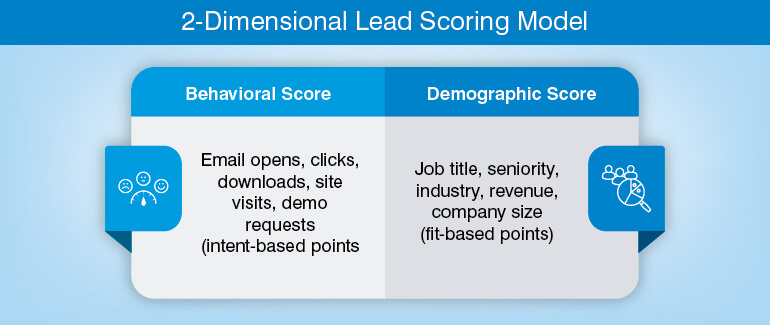
Behavioral Score
Award points for engagement behaviors
- Email Opens
- Link Clicks
- Content Downloads
- Website Page Visits
- Demo Requests
- Higher-intent actions receive higher point values
Demographic Score
Award points for firmographics
- Job Title
- Seniority Level
- Industry Vertical
- Company Revenue Range
- Employee Count
The contact will need to pass the minimum threshold in both behavioral and demographic to be sent into the Sales Sequence.
All major CRM systems and Marketing Automation Systems (including Salesforce, HubSpot & Marketo) have built-in Lead Scoring modules; however, it’s the calibration of the disqualifying threshold. The lowest score at which a lead is designated as “low-priority” and moved to nurture versus moving directly to a rep.
Use historical conversion data when setting this threshold; do not use instinctive decisions.
Pro Tip: Connect lead scoring to your CRM; if new engagement information becomes available (i.e.: previously cold lead re-activates), then lead scores should automatically update in real-time.
Static scores that don’t accurately represent a contact’s most recent activity will create false negatives such as a qualified lead being incorrectly placed into nurture instead of being passed to reps.
Lead Scoring identifies which leads are worthy of action. Lead Enrichment helps determine if you can act with enough relevant information.
Here’s something most teams discover too late: their lead scoring model is only as good as the data feeding it. A contact scored as “high priority” based on a job title that’s two roles out of date isn’t a good lead, it’s a confident mistake. That’s where the unglamorous work comes in. Automated lead cleansing tools handle the routine: invalid email removal, duplicate lead cleanup, outdated lead filtering.
But they need to run continuously, not just before a big campaign. Contact data verification and CRM data cleansing are what keep lead scoring accuracy honest over time. Without them, sales prospect database quality quietly erodes, and your reps spend their week chasing ghosts. Think of it less as a cleanup task and more as basic maintenance, the same way you wouldn’t run a campaign on a list you haven’t touched in eighteen months.
Ready to see what a clean CRM actually looks like?
Book data cleansing session »3. Use B2B data enrichment to complete incomplete lead profiles
Data enrichment for sales lead is the process by which you append new or missing fields (company size, annual revenue range, direct phone number, job title, LinkedIn profile URL, etc.) to an existing record. This cannot be confused with data cleansing. Data cleansing is the removal or correction of poor-quality data. Data enrichment adds new data to an existing record. Therefore, cleanse records first and then enrich. There is little point in enriching a record that will be deleted in the next step as it wastes enrichment dollars and provides false confidence in a record that has been identified for deletion.
Enrichment is most effective when applied to records that were qualified at a level greater than your minimum qualifications but lack one or more critical attribute elements. A lead with a confirmed email address, a job title matching your ideal customer profile (ICP), and 90 days of user engagement history but lacking company size and/or revenue information cannot be properly segmented or assigned to the proper representative. Once these additional fields are appended, this record becomes actionable.
For B2B databases, enrichment may come from third party data providers; LinkedIn; publicly available company registries; and web research.
At HabileData, our data enrichment services includes both automatic field addition via data appending combined with manual research to add fields that automated systems would not catch.
Example
A California-based video communications firm wanted to enhance 120,000 customer profiles through data enrichment prior to launching an upsell campaign. HabileData found that the customer profiles lacked data regarding company size, geographic region and industry vertical. Through two months of enrichment activities, HabileData was able to update the 120,000 customer profiles.
Based upon HabileData’s enhanced profiles, the client was better able to create accurate audience segments and the client reported improved engagement rates during their subsequent marketing campaign based upon tighter targeting related to company size and geography.
Case Study: Customer Profiling and Enrichment for Video Communication Company
Pro Tip: Do not apply enrichment until all filtering has taken place. Spend enrichment money on only those leads that have been filtered above your minimum qualification criteria.
4. Remove dirty leads by using data deduplication and validation
This is an active removal process. In the first pass of deduplication, you identify and merge duplicate records, which prevent “split ownership” and “double outreach.” During this second pass of validation, you confirm that all the contact information you’re keeping in your database after merging any duplicates is correct and deliverable.
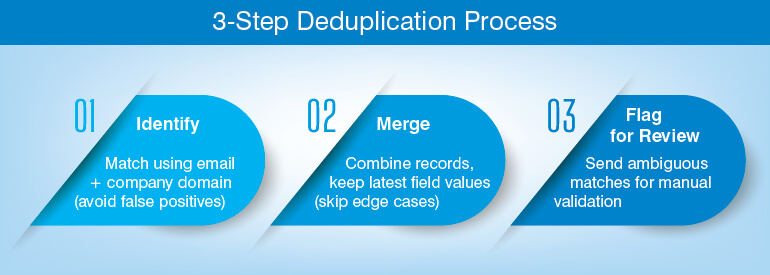
You will complete the three-step deduplication process in order:
- 1. Identify: You’ll use both the e-mail address and the company’s domain as the primary key to group suspected duplicates. If a person has multiple e-mail addresses across companies, they will generate false positive matches during the email-only identification.
- 2. Merge: When you find a group of duplicate contacts, you will merge them together into one contact record. You’ll want to keep the latest version of every field value from each duplicate. However, do not automatically merge edge cases such as two people having the same name but being employed at a different subsidiary. Since these individuals are probably not duplicates.
- 3. Flag for Review: All those records where there was ambiguity about whether they were duplicates (i.e., same name, different company email domains) should go to a manual review queue instead of either being automatically merged or removed.
Validation can occur at the same time as the above steps. Email validation will test three levels:
(1) Format/structure of the e-mail address (is it syntactically correct?)
(2) Domain activity (does a mail exchange record exist and does it resolve?)
(3) Mailbox existence (will SMTP respond to the contact?)
Also, phone validation tests if the phone number is currently active and properly assigned. Ideally, validations should run on a regular basis; i.e., not just upon creating a record. What was once true (the phone number was valid) can now be untrue (phone number was reassigned six months later).
HabileData’s data cleansing and data validation services will perform the validation layer with human review of those records that could not be cleaned up via automated processes.
Client example
A US-based lead generation company required an email list to be developed by web research. The challenges presented were multi-faceted: the target market experienced high rates of data decay; the format of collected data varied significantly among the various information-gathering sources; and there was a high percentage of outdated addresses within their legacy databases.
HabileData organized the data into standard formats; removed duplicate and incorrect entries; performed multi-layer validation; and completed additional missing field entry. As a result, HabileData provided its client with a deliverable mailing list that the client’s marketing department could use to distribute campaigns without requiring any additional review on their behalf.
Pro Tip: Cleanse/remove duplicates before ingesting new data source(s). If you add a new list to a database which contains pre-existing duplicates, it will multiply the amount of time you will need to spend cleaning up those duplicates. Remove (cleanse) the duplicate entries from the new list prior to importing that list into your existing database.
The last step cleanses the existing database as well as prevents future degradation.
5. Build a sales-marketing feedback loop to stop bad leads at the source
Bad leads recur when the process that generated them does not receive corrective information. A feedback loop is the mechanism that carries signal from your sales team back to the lead sources and ICP criteria that produced the problem.
The loop has three components:
- Reason-code flagging: Sales reps flag leads that fail in the pipeline with a standardized reason code: wrong ICP, undeliverable contact data, no budget, no authority. The flag is a data entry in the CRM, not a free-text note, so it can be aggregated and reported.
- Source-level reporting: Marketing reviews the aggregated flags weekly, broken down by lead source. A source producing a consistent high rate of ICP-mismatch flags is a structural problem, not a random quality variation. It requires a sourcing decision, not a cleansing run.
- ICP refinement: If a pattern of flags indicates that a segment of your ICP is consistently non-converting a specific job title tier, a company size band, an industry vertical the ICP definition needs adjustment. The loop feeds this back into lead scoring criteria and lead intake qualification rules.
Pro Tip: Track bad-lead volume by source on a weekly basis. A source that consistently produces flagged leads should be re-evaluated or removed from the lead intake mix – regardless of the raw volume it delivers. Volume from a low-quality source is a cost, not an asset.
With the five steps in place, the remaining question is how often to run them.
How often should you cleanse your lead database?
Sales lead cleansing is important for lead database. It should be conducted once a quarter. For databases, over 20,000 contacts with continuous inbound lead flow, move to a 60-day cycle.
When you wait for the annual cycle and let the bad data build up, you need to fix 20-25% of the database within the same window of time. That’s a reality given the average 22.5% rate of annual data decay recognized by the industry. Such a volume can disrupt your pipeline causing outbound to freeze while you absorb the load. To avoid the situation run the cleanse quarterly so each audit picks up only 5-6% of your database, only the portion that has gone stale since the last audit.
| Database Size | Recommended Cleansing Cadence |
|---|---|
| Under 5,000 contacts | Every 6 months |
| 5,000 – 20,000 contacts | Quarterly |
| 20,000 – 100,000 contacts | Every 60–90 days |
| 20,000 – 100,000 contacts | Continuous automated validation at point of entry + quarterly full audit |
To reduce the bulk of bad leads reaching each audit, you need to set up automated email validation at the point of lead capture. This traps leads with invalid emails at the form submission layer and prevents them from entering the CRM. For large scale databases, HabileData’s data validation services cover both point-of-entry validation and scheduled batch validation ensuring bad leads are filtered out.
Cleansing bad sales leads: key takeaways and next steps
A lack of good sales leads isn’t uncommon. It’s what you get with no defined structure for ensuring your CRM data quality. B2B databases lose their accuracy (at least) annually by 22.5%. In addition to stopping that loss in accuracy from building up to become a problem, the five steps (audit, scoring, enrichment, de-duplication & validation, and then feedback loop) also take only about a quarter of the time to resolve as compared to other problems.
The benefits of having a clean database include providing an accurate forecast for your pipeline, increasing the productivity of reps and enabling targeted campaigns through better profiling. Leads remaining in your database after the above process have been qualified/are contactable and have a correct profile. This is what you get for your money (ROI) when investing in improved sales pipeline data quality.
HabileData has successfully scaled this process. Just in technology, media and professional services sectors, we have already successfully validated 50 million B2B records and enriched over 120,000 customer profiles in our clients’ databases. The process described in this guide is the same process applied in those engagements, adapted for teams managing it internally.
Frequently Asked Questions About Bad Sales Leads
Sales lead cleansing is when you clean up your bad data by removing incorrect contact information (invalid e-mail addresses), eliminating duplicate accounts, and updating out of date contact information. Lead enrichment is adding additional data to an existing account – company size, position/title, direct phone #, link to LinkedIn. They go hand-in-hand but they are different processes. It should follow this order: cleanse first, then enrich. If you were to enrich a record prior to cleaning it would be a waste of money as it will most likely get removed from your list after the next pass.
In databases where there is no current method to cleanse data, it has been estimated that an approximate 25-40 percent of all entries within a database will be either partially inaccurate and/or completely inaccurate as of a given date in time. This estimate comes from both the 22.5 percent per year decline rate for accuracy of data estimates and the continued impact of each record being potentially incorrect when entered into the database.
Not every one of your “bad” leads will need to go away. For example, you have an old (invalid) e-mail for a person who still fits your ICP criteria (job title; company size; Industry). That is recoverable via an enrichment process or manually researching them to find their new e-mail. On the other hand, a lead which does not meet your ICP fit (industry; seniority level; company type) should be removed from your active pipeline.
Three controls help eliminate bad leads when entering leads into a CRM:
(1) Real-time email validation on the front-end, i.e., reject or flag an address that fails SMTP & MX checks prior to it being entered in the CRM
(2) ICP qualification criteria included in the lead intake forms e.g. “What was the company size?”, “Select an Industry”, etc. so that leads can qualify themselves against your ICP prior to being stored in the database
(3) Quality score for each Lead Source to determine which lead sources have historically produced consistently low-quality leads and therefore should be eliminated from future lead campaigns.
Your database is growing. Your data quality shouldn’t be shrinking.
Get a scalable cleansing solution »


Snehal Joshi , Head of Business Process Management at HabileData, leads a 500-member team of data professionals, having successfully delivered 500+ projects across B2B data aggregation, real estate, ecommerce, and manufacturing. His expertise spans data hygiene strategy, workflow automation, database management, and process optimization - making him a trusted voice on data quality and operational excellence for enterprises worldwide. 🔗Connect with Snehal on LinkedIn