

Email appending matches existing records against a verified reference database to retrieve missing email addresses to fill CRM contact gaps. The process covers everything right from SMTP verification, compliance matching, and field-level CRM re-import. A match rate between 25–45% will translate into a reachable pipeline without acquiring new contacts.
Contents
- Why your CRM cannot fix its own email data gaps
- What is email appending?
- 7 Step email appending process to determine match rate and deliverability
- How does email appending impact match rates, deliverability, and your CRM
- Make email appending a repeatable process for effective CRM optimization
- 5 Technical criteria to select an email appending service provider
- Conclusion – From CRM data gap to contactable pipeline
Your CRM is only as effective as the contact data it contains. Every record with missing email address is a customer you cannot reach, a lead you cannot score and of course a deal that you cannot crack. HubSpot research confirms that CRM contact data decays at 2.1% per month, compounding to 22.5% annually. For a 50,000-record database, that is 11,250 unreachable contacts lost every year without active enrichment.
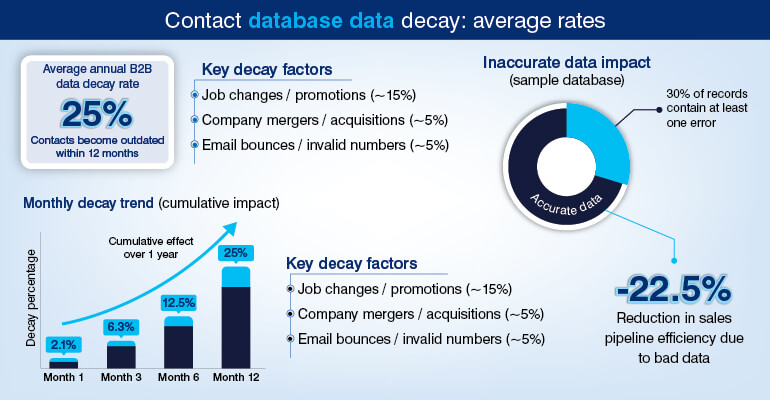
Contacts in your CRM change jobs, web domains expire, and corporate email address are generally deactivated within 30-90 days of an employee’s departure. Your marketing team noticing the bounce rate climbing is nothing more than a reactive measure. Lots of dollars, time and efforts wasted – the damage is already done.
The solution to this problem is email appending, which no CRM platform can provide on their own. In this practical guide we will see what all technicalities and workflows email appending service providers use, what to expect from email appending and how to make appending process a repeatable CRM data management cycle.
Find out how many of your CRM records are still reachable – get a free data health audit.
Run a Free CRM Data Audit »Why your CRM cannot fix its own email data gaps
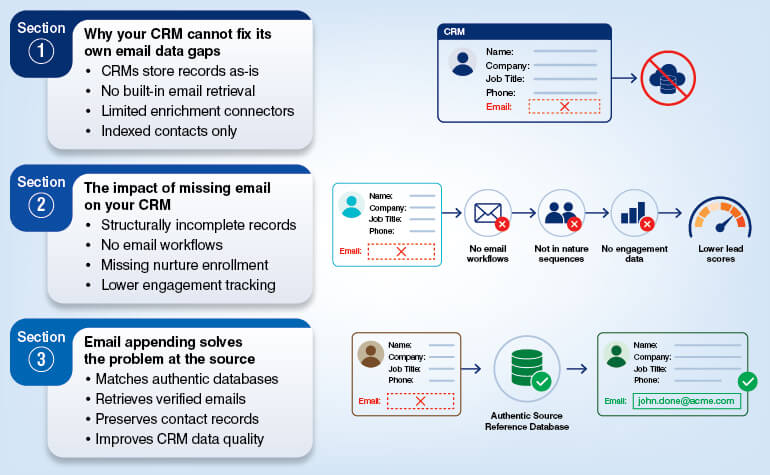
Salesforce, HubSpot, and Microsoft Dynamics are amongst the many CRM platforms that store records exactly as they receive. There is no inbuilt mechanism to retrieve a missing email field from an external source. The latest versions of these platforms do come with “built-in enrichment connectors”, i.e., Salesforce’s now-deprecated Data.com and LinkedIn Sales Navigator syncs. But mind it, these cover contacts already indexed by those platforms. For rest of the non-indexed contacts, it is advisable to hire data enrichment service providers.
Addressing legacy records imported from trade shows, event registrations, or bulk list uploads that arrived without email data in the first place is a bigger and prominent challenge. They create a much bigger gap, and you should not withhold your team from leveraging data appending to fill the gaps in your database.
This chaos will result in a class of structurally incomplete CRM records; which has contacts with name, company, job title, and phone number, but no email address. Use it in any marketing automation platform, but these records will never be able to trigger an email workflow, cannot be enrolled in a nurture sequence and will never help you in accumulating behavioral engagement data.
Said that, lead scoring models, like Salesforce Einstein or HubSpot’s predictive scoring, inclined towards email activity; will artificially suppress the score of such contacts. Such contacts mostly never qualify as an MQL despite representing a strong fit. The gravity of this problem is more severe than most CRM admins can estimate. A study of 1,000 business contacts found that nearly 71% of them had at least one change; job title, company, or contact information or something else within 12 months.
Email appending addresses this challenge at source. Expert email appending service providers match your existing CRM records against authentic data sources to retrieve and append verified email addresses; without disturbing the underlying contact records.
What is email appending?
Email appending is the process of submitting existing CRM records – identified by name, company, postal address, or phone – to a permission-sourced reference database in order to retrieve a verified, SMTP-confirmed email address for each record where a confident match exists. No new contacts are added; only missing fields on your current records are populated.
This is not same as purchasing an email list from a data aggregator. Here, the contact records are yours, and the appending process will enrich them. The scope of work does not include adding new contacts into your pipeline. The output, after process, is your existing CRM data with missing fields now populated and verified.
Forward append vs. Reverse append: Which is better for CRM optimization
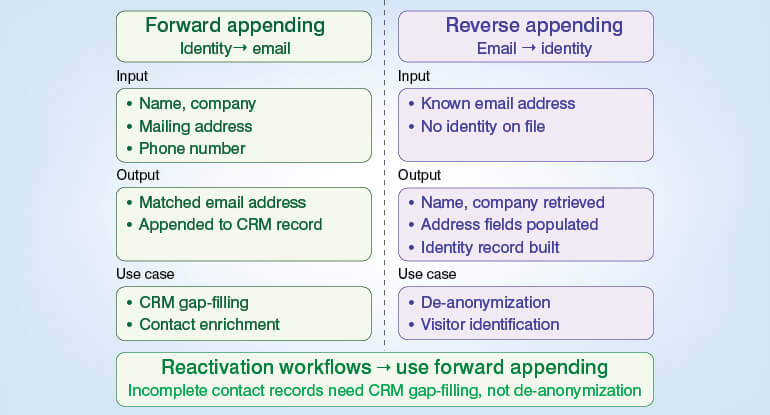
The clean side-by-side comparison shows Input, Output, and Use case. The key recommendation are:
- Use forward email appending for reactivation workflows
- Use CRM gap-filling for incomplete contact records and not de-anonymization.
Not sure if you need forward or reverse appending? Talk to a specialist who can map the right process to your CRM gaps.
Speak to an Append Specialist »7 Step email appending process to determine match rate and deliverability
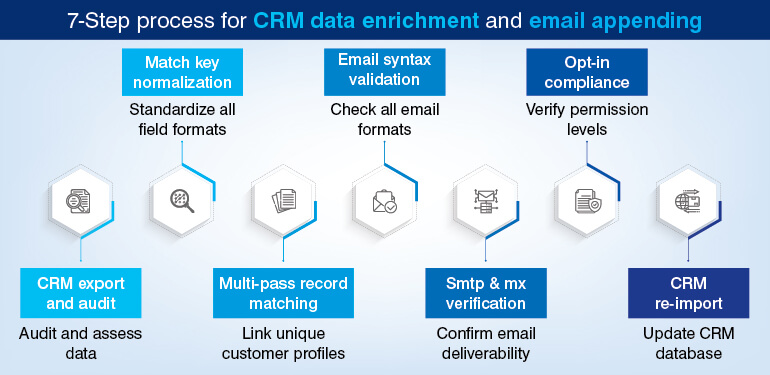
Decisions that you make at each step of the pipeline determines the quality of an email append output. Here’s the workflow that talks about where exactly the match rates degrade and where the risk to deliverability enters the game.
Step 1: CRM export and field audit
You start by extracting the target record set from the CRM. Then identify the match attributes like full name, company name, job title, physical address, and phone number. Now, before submitting the dataset, audit it for incomplete or incorrect data that can suppress match rates.
The file might have problems in fields like (Mr. John Smith instead of John Smith), company names with embedded legal designations (Acme Inc. instead of Acme), and address fields in non-standardized formats.
Once done, export a deduplicated dataset file. Do not submit duplicate records. It wastes match capacity and will return conflicting email values for the same contact.
Step 2: Match key normalization
Before you submit the records to the reference database, see to it that all input fields are normalized, i.e., punctuation stripped, abbreviations standardized (St. to Street, Corp. to Corporation), and case folding applied. This is very important because it has a direct and measurable effect on the match rate.
Consistently 10-15% higher raw match rates is what is reported by those who have robust normalization pipelines, as against those who do minimal preprocessing on the same input data
Step 3: Multi-pass record matching against the reference database
It’s time to match normalized records against a proprietary, permission-sourced reference database of name-email-company associations. Match logic runs in different passes, and each pass returns a confidence score like:
- First: Exact match on full name and company domain
- Second: Fuzzy match on name and postal code
- Third: Probabilistic scoring on remaining fields
Records that fall below the configurable threshold are either routed for manual review, or are excluded from the output, completely.
Said that, don’t forget that the size of the reference database, sourcing methodology and the frequency at which you refresh it; are the determining factors of “what is possible at this stage”.
It is very simple; quarterly updated database will produce higher initial match rates but can give lower email deliverability than the database which is refreshed in near-real-time.
Step 4: Email syntax validation
Make all email addresses pass through RFC 5322 syntax validation before conducting the deliverability check. This activity will filter out structurally malformed email addresses that result in hard bounces regardless of mailbox status.
It will also take care of email addresses with missing @ symbols, invalid domain structures, or disallowed characters. It is meticulous but interesting to know how to validate B2B email databases.
Step 5: Real-time SMTP and MX record verification
One of the challenges your CRM faces is to find out if the target mailbox exists at the receiving mail server. SMTP handshake verification confirms this. MX record lookup confirms the domain is configured to accept email. Both these checks eliminate dead addresses before they enter your CRM and makes it easier for email campaigns to perform at optimum.
This step of SMTP and MX record verification also identifies role-based addresses, i.e., info@, support@, admin@. It also catches all domains where the server accepts all incoming emails, regardless of whether a specific mailbox exists or not. Companies looking out for guaranteed hard deliverability configure the append process to eliminate catch-all results.
Email appending service providers are more inclined towards using real-time SMTP verification instead of batch verification run 48–72 hours before delivery. The check occurring against current server state helps them produce much clearer output. It is one of the CRM data hygiene best practices for business listing databases.
Step 6: Opt-in compliance matching
Permission flags in the provider’s source database are used for cross-referencing appended emails. Records with documented consent is allowed to pass through for GDPR-covered regions.
At times clients submit their suppression list with attributes like prior unsubscribes, litigation flags, or known hard bounces; SHA-256 hashed email matching is used for cross-referencing without exposing raw PII to the provider.
Step 7: CRM re-import and field mapping
Format that matches the target CRM’s import schema like Salesforce CSV, HubSpot import template, or via REST or SOAP API is used to return enriched datasets. To determine how the appended data will be integrated with your existing records, making informed field mapping decision at this stage is important.
You also need to define in advance as to which CRM object will receive the update (Contact vs. Lead in Salesforce), what happens in case of present partial email value, and should the import trigger automation workflows like enrollment in a re-engagement sequence.
See how this 7-step process is applied to a real CRM dataset – from export to re-import.
Request a Live Workflow Demo »How does email appending impact match rates, deliverability, and your CRM
The outcome of email appending activity depends largely on the age of the CRM database, completeness of the match keys and of course the coverage of the reference database used. To prevent misaligned expectations and protect vendor relationships, it is good to set realistic benchmarks.
What email append match rate means for your pipeline?
Email append match rates usually fall between 25–45%, but for records that have reasonably clean match keys. It is noteworthy that records that are older than three years, or records with missing company name fields, and international records that fall outside the coverage of data provider’s database; are the factors that reduce this range significantly.
If 50,000 contact in your CRM has 35% match rate, it returns 17,500 previously unreachable contacts. This is the output without acquiring a single new lead. So, in case the cost-per-appended-contact is $0.20 to $0.50 with a typical email appending service provider, the cost-per-newly-contactable-record is a fraction if compared to what the same pipeline coverage would cost through paid acquisition.
How to measure the append quality?
Email deliverability rate is the metric used for validating the quality of email appending. Once the append activity is done, the deliverability on SMTP-verified records should be in the range of 90-95%. If you find that the hard bounce rate is above 3%, it means that the service provider skipped a batch verification. It is a clear sign of compromised quality.
If your appended contacts return unverified addresses, it means that your hard bounce rate will most likely push above the 2% threshold, at which ISPs begin throttling delivery. At 5% the domain blacklisting becomes a risk.
You can track the bounce rate by append batch using a custom CRM field (e.g., Email_Source = ‘Appended_Q2_2025’). It will help you isolate appended contacts from organic opt-ins in your deliverability reporting. This is essential if you want to measure append ROI accurately
When can you enroll newly appended emails for re-engagement post-import?
Newly appended emails can be enrolled in re-engagement workflows immediately post-import. Start by segmenting the original CRM records by age, because a contact that has remained dormant for two years will need a different treatment than a contact that has been dormant since six months.
For appended contacts, initial open rates will tend to range between 15-25%. Expect them to be lower than organic opt-in lists. It is due to the missing prior email relationship, and not a failure of the email append process. Nothing wrong if you suppress non-openers after 2-3 sends, in order to protect your reputation as a sender before the relationship is established.
Why recalibrate leads scoring after appending emails?
Predictive lead scoring in platforms like Salesforce Einstein or HubSpot; missing email fields suppress the contact’s behavioral score because they cannot gather email interaction data. So, you are supposed to re-score the affected segment once again.
You will notice that contacts which had very low score because of missing field, but once the email engagement data starts gathering those contacts start crossing the MQL threshold. But remember, these are not new leads. They are existing contacts your system was not able to evaluate properly.
How to Make Email Appending a Repeatable CRM Data Management Cycle (Not a One-Off Fix)
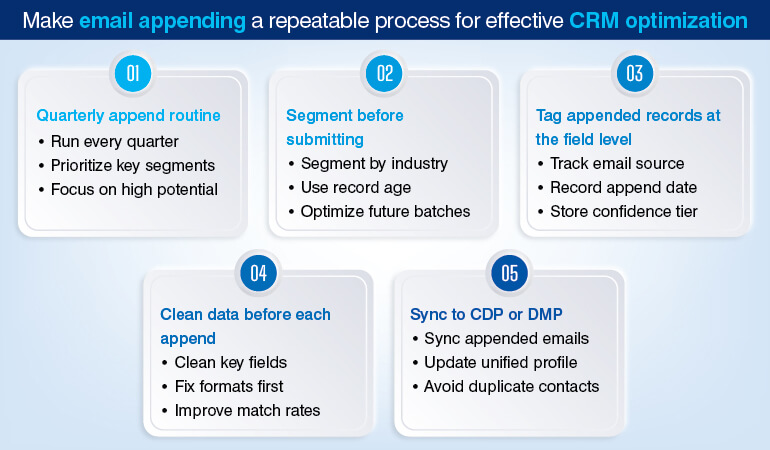
A single email append even can be a one time fix, but it cannot be a data strategy. Email data decays at 2.1% every month. So, if you plan on running one annual append, the last quarter of your database is already degraded in tune to 6-8% by the time your next project begins.
You, or for that matter any organization cannot afford to have so much of dirty email data in the CRM. That’s why it is suggested to treat email appending as a recurring operational process and not a remediation event.
- Implement a quarterly append routine for high-priority segments: Submitting your entire CRM for appending each cycle is not at all a good idea. Instead prioritize by pipeline stage, last activity date, and account revenue potential. Also, ensure that lapsed customers and active opportunities who made purchases recently should receive priority over cold, low-fit accounts.
- Segment data batches before submission: Appending an identical batch will muddle which record types produce the best match rates. It also blocks the view of how downstream engagement looks like. It is better you segment data by industry, record age, and data source before submission. It will help you with data to optimize future batches.
- Tag appended records at the field level: Start by creating custom CRM fields like Email_Source, Email_Append_Date, Email_Confidence_Tier for every appended record at import. This will enable precise deliverability attribution and help you to suppress low-confidence records from high-stakes campaigns and make compliance audits tractable.
- Run data cleansing before each append submission: It’s a myth that email appending fixes corrupt data. It adds missing data. Matches key fields like name of client, company name, postal address, etc., which are malformed or non-standard will likely suppress match rates. If you want consistent match rates across batches, don’t treat data cleansing of these fields as an option.
- Sync appended emails back to your CDP or DMP: If you are running a Customer Data Platform, ensure you sync back appended emails back to the unified contact profiles. It will help you avoid duplicate contact nodes across the platform. Understand, a record enriched in CRM but not updated simultaneously in the CDP will generate split attribution and inconsistent audience segments.
It takes robust workflows and expert human intervention for data enrichment post email append, and only an experienced data appending service provider can help you with it.
5 Technical criteria to select an email appending service provider
As you might be aware, not all email appending service providers operate with the same standards of cost, quality and turnaround time. The difference in terms of deliverability and compliance exposure surfaces, but usually, after you have already imported the append batch into you CRM.
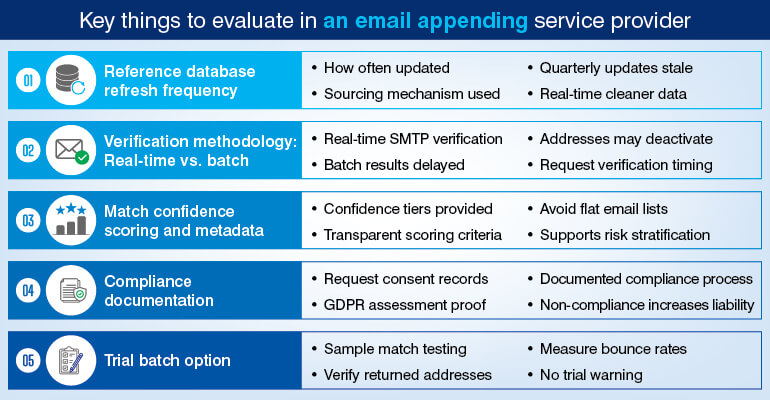
Here are five criteria that you should use to evaluate vendors before signing the data processing agreement with them.
- Database refresh frequency: Ask the email appending service provider about how often they update their database. Also inquire about what sourcing mechanism they use; opt-in, co-registration, or a B2B directory. This is extremely important for B2B lead generation.
A database that is updated quarterly or less will produce records that are stale at the time of delivery. Service providers who refresh their database continuously or in near real-time will fetch you more cleaner outputs because the match will reflect current employment status and not historical facts.
- Verification methodology: real-time vs. batch: Without fail confirm the service provider’s verification timing and document it. This is very critical because real-time SMTP verification will confirm mailbox status at the time of matching. Whereas batch verification results tend to vary and can be 48–72 hours stale by the third party email append service provider delivers them. This much time is enough for addresses to deactivate.
- Match confidence scoring and metadata: A reputed service provider will always deliver a confidence tier, high, medium, low; with every returned record to make the scoring criteria transparent. Don’t even shortlist the providers who intend to return flat file of email addresses with no confidence metadata. It’s no fun risking the output before importing the results into your CRM.
- Compliance documentation: Also ask for the data sourcing consent records from the service provider. This has to be backed by documented process for GDPR legitimate interest assessments. If any provider is unable to produce these on request do not hire email appending services, as they become a regulatory liability, irrespective of the match rate.
- Pilot project: Nothing wrong in asking for a sample match on 1000-1500 records before getting into an agreement with the service provider. Then calculate the match rate on the sample, run an SMTP verification pass on the returned addresses independently. Don’t forget to measure the hard bounce rate on a test send, before you approve the full batch
Conclusion – From CRM data gap to contactable pipeline
Dirty email addresses create unreachable contacts, leading to orphaned CRM records that cannot trigger workflows, these records cannot accumulate engagement data, and such datasets do not quality as MQLs. The value chain is direct and clear. Depending on email appending proves favorable. It reverses this data adversary at the field level without replacing the underlying contact records or introducing unqualified contacts into the pipeline.
The contacts are already in your CRM. The email addresses that make them reachable are available. The process to connect them is well-defined. So, what you now need is assistance from email appending experts.
Your CRM contacts are there. The verified emails to reach them exist. Let us run the match.
Start Your CRM Email Append Project »


Snehal Joshi , Head of Business Process Management at HabileData, leads a 500-member team of data professionals, having successfully delivered 500+ projects across B2B data aggregation, real estate, ecommerce, and manufacturing. His expertise spans data hygiene strategy, workflow automation, database management, and process optimization - making him a trusted voice on data quality and operational excellence for enterprises worldwide. 🔗Connect with Snehal on LinkedIn