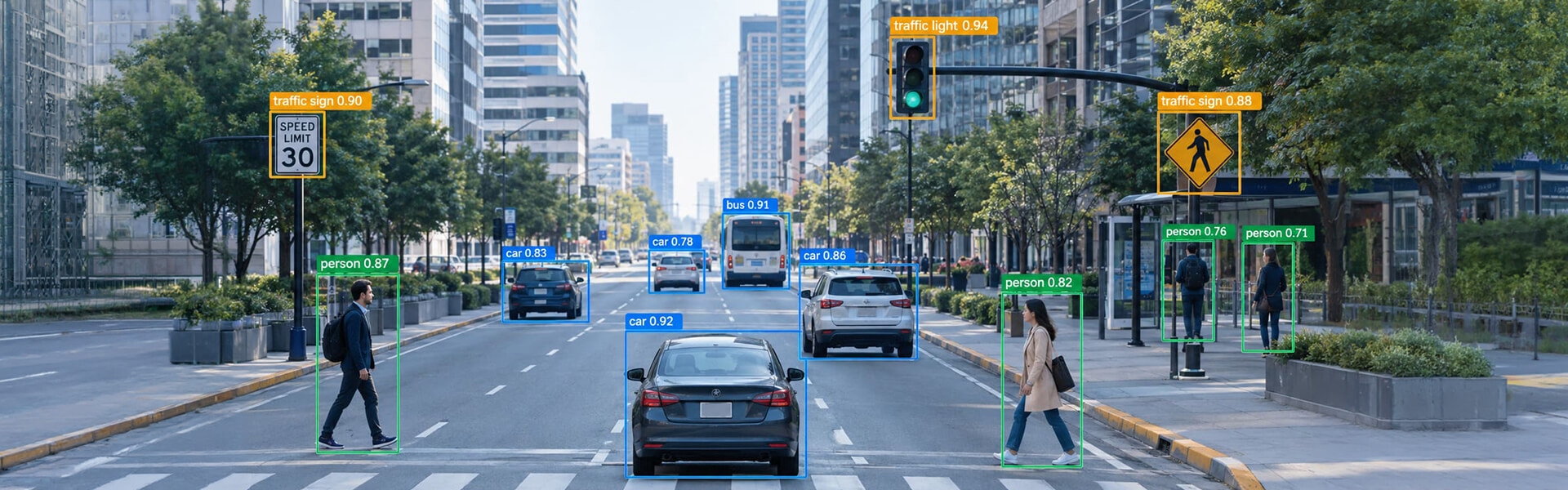
Image annotation for object detection requires bounding boxes that match your model’s coordinate contract. YOLO uses normalized center coordinates, zero-indexed. Faster R-CNN uses absolute corners with class 0 as background. This guide covers formats, tightness rules, occlusion policy and QA gates.
Contents
- Why Annotation Errors Never Show Up in Your Validation Metrics
- What a Detector Actually Learns from a Bounding Box Annotation
- How to Annotate Images for Object Detection: An 8-Step Workflow
- YOLO vs COCO vs Pascal VOC: The Format Differences That Break Pipelines
- Common Image Annotation Challenges and How to Solve Them
- Do Newer YOLO Versions Change the Annotation Format?
- When to Outsource Training Data Annotation for Computer Vision
- Frequently Asked Questions
Image annotation for object detection means drawing bounding boxes that match your model’s coordinate contract, then enforcing that contract at scale. YOLO expects normalized center-based coordinates in per-image text files. Faster R-CNN expects absolute corner coordinates, with class 0 reserved for background. Getting the geometry right matters less than getting the rules consistent.
Why Annotation Errors Never Show Up in Your Validation Metrics
Here is a pattern we see roughly once a quarter.
A team ships a warehouse detection model. Validation mAP@0.5 sits at 0.91. In production it misses forklifts about a third of the time, mostly when a pallet stack clips the front wheels.
The instinct is to blame the model. Bigger backbone, higher input resolution, longer training. None of it moves the number.
The actual cause is in the labels. Two annotators handled the occlusion cases differently. One boxed the visible forklift, the other boxed where the whole forklift would be. The model received two contradictory definitions of the same object and split the difference on both.
This is not a rare edge case. It is the normal condition of computer vision datasets, and the research keeps confirming it:
- Google researchers who interviewed 53 AI practitioners across India, East and West Africa, and the US found data cascades, compounding downstream failures caused by upstream data problems, in 92 percent of cases.
- An automated audit of MS-COCO, the most-cited detection benchmark in the field, estimated that roughly 5 percent of images contain missing object annotations, 3 percent contain localization errors, and 0.7 percent contain wrong class assignments.
- When a 2025 research team re-annotated MS-COCO and retrained five detectors with no architecture changes at all, Faster R-CNN gained 1.1 AP points on a clean validation set, and 1.6 points on small objects. Same model, same hyper parameters, better labels.
That last result is the argument for this entire article. The cheapest available accuracy gain in most computer vision projects is not architectural. It is annotation discipline.
A converter can fix a coordinate convention in an afternoon. Nothing fixes a dataset where the occlusion rule changed halfway through.
This guide covers what actually goes wrong in image annotation for object detection, and how production annotation teams prevent it.
What a Detector Actually Learns from a Bounding Box Annotation
A detector does not see “a box around a car.” It sees two things.
First, a regression target: four numbers the network is penalized for missing. Second, an assignment decision: every anchor, grid cell, or query that does not overlap a labeled box gets trained as a negative.
That second point is why missing labels hurt more than sloppy ones. An unlabeled object is not neutral. It becomes a region the model is explicitly taught to suppress. Ultralytics states the case bluntly in its training guidance: partial labeling will not work.
Research on detection under sparse annotation backs this up with a counter intuitive finding. For an equal number of labeled objects, fewer images labeled thoroughly beats more images labeled partially. Volume does not compensate for gaps.
So the practical order of severity, worst first:
- Missing instances. The model learns to ignore real objects.
- Class swaps between visually similar classes. The classification head gets contradictory gradients.
- Inconsistent occlusion policy. Regression targets for the same visual situation disagree.
- Loose or shifted boxes. Recoverable, and scale dependent (more on this below).
Most annotation vendors optimize for point 4 because it is the easiest to measure. Points 1 through 3 cause more model failures.
How to Annotate Images for Object Detection: An 8-Step Workflow
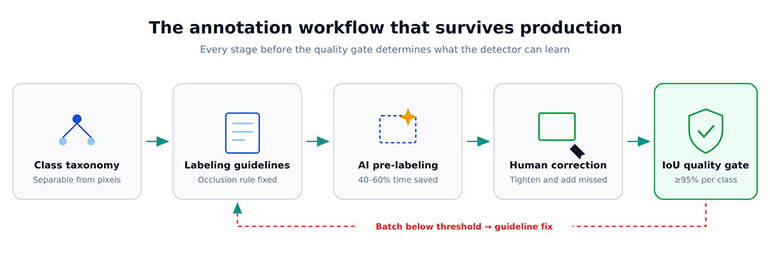
Step 1. Design the class taxonomy before anyone draws a box
Classes must be separable from pixels inside the box. That is the test.
If an annotator needs surrounding context to decide between “delivery van” and “service van,” a detector cropping to the region proposal cannot decide either. Merge the classes and recover the distinction downstream with an attribute model.
Practical rules we apply on scoping calls:
- Any class expected to hold under roughly 1 to 2 percent of total instances will be starved. Merge it, or plan targeted collection.
- Ultralytics recommends at least 1,500 images and 10,000 instances per class for a YOLO dataset. Treat that as an order of magnitude, not a law.
- Avoid encoding attributes as classes. Six vehicle types across four colors is 24 classes, each with a quarter of the data it needs.
Step 2. Write object detection labeling guidelines, then calibrate on them
An annotation guideline that does not answer these questions is not finished:
| Decision | What the guideline must specify |
|---|---|
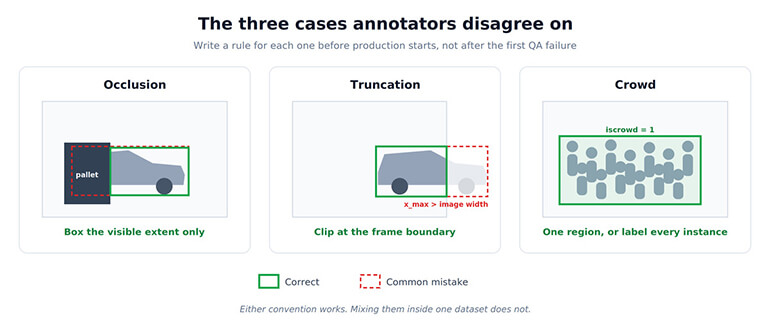
| Occlusion | Modal (visible extent only) or amodal (estimated full extent). Pick one. |
| Truncation | Clip to image boundary. Never allow coordinates outside the frame. |
| Minimum size | Below what pixel threshold do you mark an object ignore rather than label it |
| Crowds | Individual boxes, single group region, or excluded zone |
| Ambiguous instances | Reflections, screens, posters, toys, printed images of the object |
| Multi-frame data | Whether identity and box style must stay consistent across a sequence |
Modal versus amodal is the one that silently ruins datasets. COCO’s convention labels the visible extent. If your annotators guess at hidden extents on some images and not others, the model receives two different definitions of the same class and the localization loss never converges cleanly.
Calibration matters more than the document. Have every annotator label the same 50 images, measure pairwise IoU, and discuss every disagreement before production starts. HabileData runs this as a formal stage because guideline drift is cheaper to catch in 50 images than in 50,000.
Step 3. Lock the annotation format contract before labeling starts
Decide the target format before annotation, not at delivery. Conversion is loss in ways that are not obvious. Converting COCO polygons to YOLO detection boxes discards the mask, which is fine for a detector and fatal if anyone downstream wanted segmentation.
Step 4. Pre-label with a model, then correct the output
Model-assisted labeling is standard now. A detector trained on the first few thousand images, or a foundation model like SAM, produces candidate boxes that annotators adjust rather than draw.
This cuts per-image time by 40 to 60 percent on structured datasets in our production work. It also introduces a failure mode that took us a while to name: annotators accept plausible-looking boxes without checking them. A box that is 6 pixels loose looks correct at normal zoom. Nobody edits it.
The counter is a QA sample drawn specifically from accepted-without-edit pre-labels, not from the general population. Those are the boxes nobody looked at twice.
Step 5. Set bounding box tightness in scale-relative terms
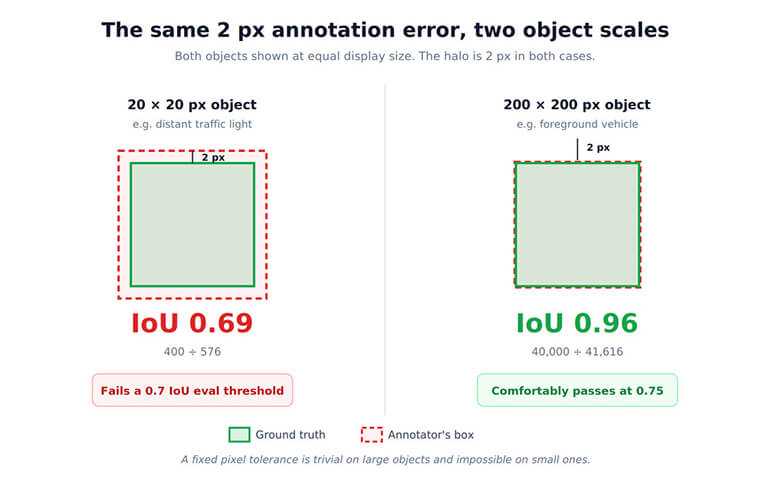
Most annotation specs state box tolerance in pixels. The arithmetic says that is the wrong unit.
Take a 2 pixel halo around a box, uniform on all sides. On a 200 x 200 pixel object, the resulting IoU against ground truth is 40000 / 41616, about 0.96. Negligible.
On a 20 x 20 pixel object, the same 2 pixel halo gives 400 / 576, about 0.69. That instance now fails a 0.7 IoU evaluation threshold entirely.
A flat “within 2 pixels” tolerance is therefore meaningless. It is trivially easy on large objects and impossible on small ones. Specify tolerance as a fraction of object size, and tighten review sampling on the small-object bucket, where COCO defines small as area under 32 x 32 pixels.
Step 6. Gate every batch on IoU and inter-annotator agreement
Quality has to be a number attached to a batch, not an assurance in a proposal.
Our standard thresholds are 95 percent or higher IoU for bounding boxes, 93 percent for polygon, and 92 percent for semantic segmentation, measured per class on every batch. Batches below threshold get re-annotated at no charge.
Report errors by type, not as a single score. The TIDE framework (Bolya et al., ECCV 2020) splits detection error into six types: classification, localization, both together, duplicates, background false positives, and missed ground truth.
That taxonomy works just as well for label QA as for model evaluation. A batch failing on localization needs tooling and tolerance changes. A batch failing on classification needs a guideline rewrite. A single aggregate score tells you neither.
Step 7. Split the dataset by source, not by image
Random image splits leak. Video-derived datasets are the worst case: consecutive frames are near-duplicates, so a random split puts almost-identical images in train and validation.
The result is validation mAP that looks excellent and production performance that does not. Split by scene, session, camera, or capture day.
Step 8. Render the labels before you train
Load 200 random training samples with boxes drawn and look at them. YOLO’s train_batch*.jpg output exists for exactly this. Most format bugs are visible in ten seconds and invisible in a metrics dashboard.
YOLO vs COCO vs Pascal VOC: The Format Differences That Break Pipelines
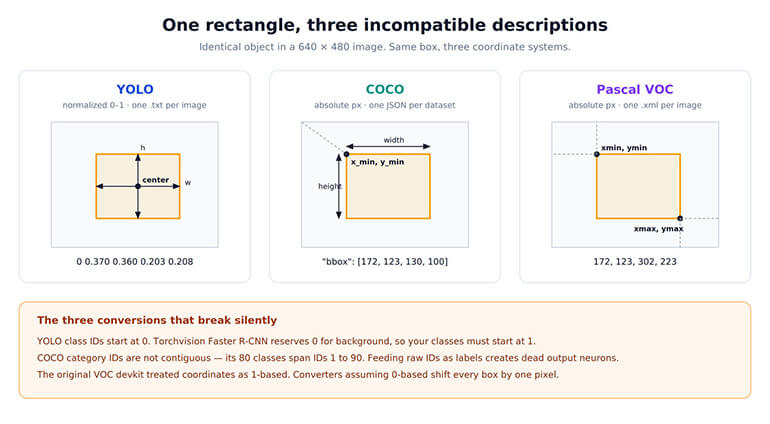
All three describe the same rectangle. They disagree on almost everything else.
| # | YOLO (Ultralytics) | COCO | Pascal VOC |
|---|---|---|---|
| File layout | One .txt per image | One JSON for the whole dataset | One .xml per image |
| Box representation | x_center, y_center, width, height |
[x_min, y_min, width, height] |
xmin, ymin, xmax, ymax |
| Units | Normalized 0 to 1 | Absolute pixels | Absolute pixels |
| Class indexing | Zero-indexed, contiguous | Arbitrary integer IDs, gaps allowed | Class name strings |
| Crowd handling | None | iscrowd flag with RLE |
difficult flag |
| Empty images | No file needed | Image entry with no annotations | XML with no objects |
| Typical consumer | Ultralytics YOLO, Roboflow | Detectron2, MMDetection, DETR, torchvision | Legacy pipelines, some TF models |
YOLO annotation format: structure, rules and common mistakes
Each line is one object:
class_id x_center y_center width height
All four coordinates are normalized by image width and height, so every value falls between 0 and 1. Class IDs start at 0.
Directory structure is not optional. Ultralytics derives the label path by substituting /images/ with /labels/ in the image path. Put label files in the image folder and training runs with zero labels found, often without an obvious error.
dataset/
├── images/train/img001.jpg
├── labels/train/img001.txt
└── data.yaml
Two YOLO-specific points worth knowing:
- An image with no .txt file is a valid background image. Ultralytics recommends roughly 0 to 10 percent background images to reduce false positives, noting COCO carries about 1 percent.
- There is no background class. Index 0 is a real object class, which is the opposite of the Faster R-CNN convention below.
Faster R-CNN dataset preparation in torchvision
Torchvision’s Faster R-CNN expects per-image target dictionaries:
target = {
"boxes":  FloatTensor[N, 4],   # [x1, y1, x2, y2] in absolute pixels
"labels": Int64Tensor[N],      # 0 is reserved for background
}
Three constraints that cause real training failures:
- Coordinates must satisfy
0 <= x1 < x2 <= W and 0 <= y1 < y2 <= H.Degenerate boxes where x1 == x2 throw an assertion during training. These usually come from rounding tiny boxes during a format conversion. - Your classes must start at 1. Set num_classes to your class count plus one for background.
- COCO category IDs are not contiguous. COCO's 80 classes occupy IDs from 1 to 90. Feeding raw category IDs as labels silently creates dead output neurons.
The COCO evaluation fields area and iscrowd are also used at eval time to bucket results by object size and to ignore crowd regions. Annotation vendors that leave these fields as placeholder zeros produce datasets that train but evaluate incorrectly.
Converting between annotation formats without losing precision
YOLO to absolute corner coordinates:
x1 = (x_center - width/2)  * image_width
y1 = (y_center - height/2) * image_height
x2 = (x_center + width/2)  * image_width
y2 = (y_center + height/2) * image_height
COCO to Pascal VOC is x_max = x + w, y_max = y + h. Watch this one: the original VOC development kit treated pixel coordinates as 1-based, so naive converters introduce a one pixel shift throughout the dataset. Harmless on large objects, measurable on small ones.
Common Image Annotation Challenges and How to Solve Them
| Challenge | What goes wrong | Practical solution |
|---|---|---|
| Heavy occlusion | Annotators mix modal and amodal boxes | Fix one policy in the guideline, add a visibility attribute, audit occluded instances separately |
| Objects at frame edge | Coordinates fall outside image bounds and break normalization | Clip at annotation time, then validate that all YOLO values fall in [0,1] |
| Dense crowds | 200 overlapping instances per image, inconsistent counts | Use COCO iscrowd with an RLE region, or define an explicit ignore zone |
| Small objects | Box error dominates IoU at small scale | Tile images at high resolution, annotate tiles, merge boxes with NMS afterwards |
| Class confusion | Visually similar classes drift between annotators | Merge into a parent class, recover detail with a downstream attribute model |
| Reflections and depictions | A car in a shop window, a person on a billboard | Decide once, in writing, and add worked examples to the guideline |
| Video sequences | Same object boxed differently across frames | Interpolate between keyframes, then review the track, not individual frames |
| Pre-label acceptance | Plausible model boxes accepted uncorrected | Sample QA specifically from unedited pre-labels |
Do Newer YOLO Versions Change the Annotation Format?
The YOLO family has moved well past v5 and v8. YOLO11 arrived in 2024, and YOLO26 in January 2026 with NMS-free inference and small-target-aware label assignment.
None of this changes the annotation contract. The label format has stayed stable across Ultralytics generations, and that is worth sitting with for a second: a well-annotated dataset outlives four model architectures. The architecture you are excited about today will be legacy in eighteen months. The labels will not be.
Faster R-CNN remains in production wherever two-stage precision beats single-stage latency, particularly in medical imaging and industrial inspection.
When to Outsource Training Data Annotation for Computer Vision
Building an in-house annotation team makes sense when your domain requires expertise you cannot transfer, and when volume is steady enough to keep people busy.
It makes less sense when you need 200,000 images labeled in six weeks and then nothing for a quarter.
HabileData's image annotation services run on that second pattern: 300 or more specialist annotators, 10,000+ images daily at standard throughput, three-stage QA with per-class IoU on every batch, and delivery in COCO JSON, YOLO TXT, Pascal VOC XML, or a custom schema. We work inside your existing platform, whether that is CVAT, Labelbox, SuperAnnotate, Roboflow, or V7.
Teams building AI and ML training data pipelines usually care about two things beyond price: whether quality is measured, and whether the vendor can read a guideline document written by an ML engineer without needing it translated.
Ask for a pilot batch on your hardest 500 images, not your cleanest. Then run the numbers yourself. Any vendor that objects to that has told you something useful.
If you want a second opinion on an existing dataset or a pilot on a new one.
Talk to our annotation team »Frequently Asked Questions
YOLO stores one text file per image with normalized center coordinates and zero-indexed class IDs. COCO stores the whole dataset in a single JSON file using absolute pixel coordinates in [x_min, y_min, width, height] form, with arbitrary category IDs and support for segmentation, crowds, and keypoints.
Tight enough that no visible background sits between the object and the box edge, with tolerance specified relative to object size rather than in fixed pixels. A 2 pixel error costs about 0.04 IoU on a 200 pixel object and about 0.31 IoU on a 20 pixel object.
Either works. Mixing them does not. COCO convention labels the visible extent, and most teams follow it. Whichever you choose, write it into the guideline with worked examples and audit occluded instances as a separate QA bucket.
Ultralytics recommends at least 1,500 images and 10,000 instances per class for YOLO training. Fine-tuning a pre-trained model on a narrow domain often works with a few hundred images per class. Class balance and image variety matter more than raw count.
For YOLO, yes. Ultralytics recommends about 0 to 10 percent background images to reduce false positives. They need no label file. For torchvision Faster R-CNN, pass an empty boxes tensor of shape (0, 4).
Almost always the directory structure. Ultralytics builds the label path by replacing /images/ with /labels/, so label files must sit in a parallel labels/ tree with filenames matching the images. Non-normalized coordinates and stray class indices above nc - 1 are the next most common causes.
Through inter-annotator agreement and per-class IoU against a gold-standard set. HabileData maintains a 95 percent or higher IAA standard with per-class IoU reported on every batch. Ask any vendor for the number and the sampling method behind it.



Biju Peter is a Senior Project Manager with 22+ years in the BPM industry, specializing in large-scale data operations and annotation-driven projects. He brings deep expertise in data processing, web research, scraping, and multi-modal annotation across image, text, audio, and video domains. He has successfully led 200+ projects, managed large teams, and delivered scalable, high-quality solutions for global AI and machine learning initiatives for clients across the globe. 🔗Connect with Biju on LinkedIn