
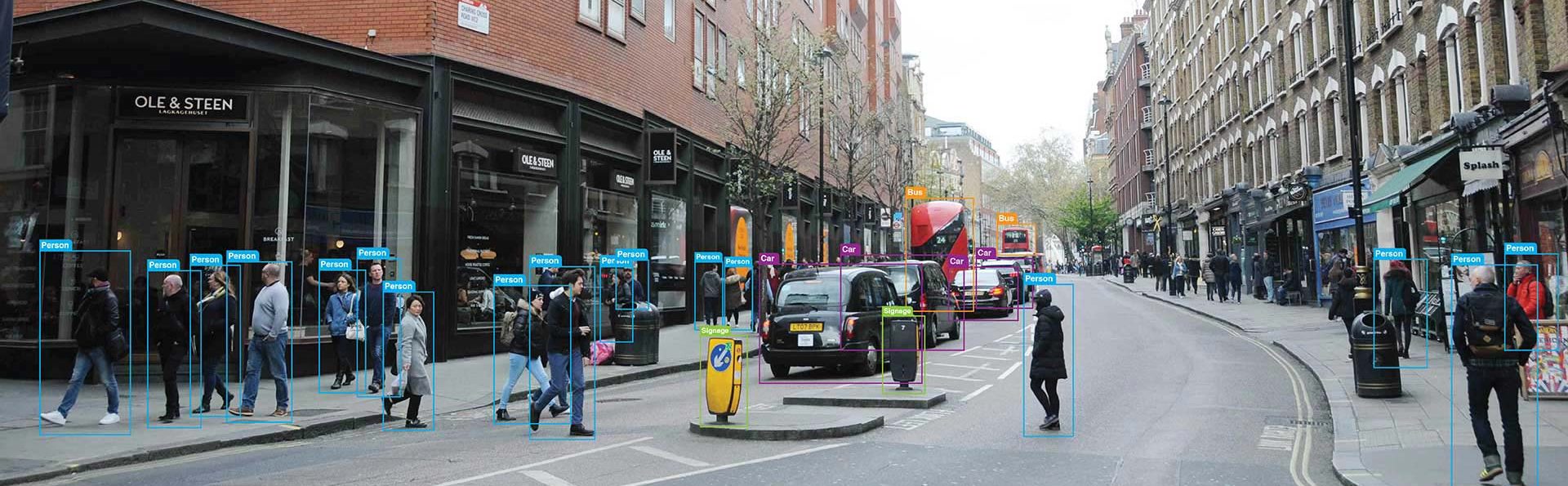
Image annotation is the foundation of every computer vision model. This practitioner’s guide covers annotation techniques with real examples, a decision tree for choosing the right type, tool comparisons from hands-on use, cost benchmarks per annotation type, and a complete project walkthrough.
Contents
- What Is Image Annotation?
- Why Image Annotation Matters for Computer Vision
- 7 Core Types of Image Annotation
- Annotation Type Comparison: Quick Reference
- Choosing the Right Annotation Type: A Decision Framework
- How to Annotate Images: A Step-by-Step Workflow
- Choosing the Right Annotation Type: A Decision Framework
- Top Image Annotation Tools in 2026: Hands-On Comparison
- Image Annotation Applications Across Industries
- 10 Image Annotation Best Practices for Production Quality
- Image Annotation Challenges and How to Overcome Them
- Key Quality Metrics for Image Annotation Projects
- The Future of Image Annotation: What’s Changing in 2026 and Beyond
- Should You Outsource Image Annotation or Build In-House?
- Conclusion: Build Better AI with Better Annotations
- FAQ
Every computer vision model is only as strong as its training data. And training data starts with image annotation.
Image annotation is the process of labeling visual data so AI models can learn to detect, classify, and segment objects. Without accurate annotations, even the most advanced algorithms fail.
This guide goes beyond definitions. It shares practical workflows, tool comparisons, and quality benchmarks drawn from real annotation projects.
Whether you manage an in-house ML team or outsource annotation at scale, this resource will help you make better decisions.
Key takeaway: Annotation quality sets the ceiling on your model’s accuracy. Getting it right the first time prevents expensive relabeling later.
What Is Image Annotation?
Image annotation is the process of adding structured labels to images. These labels teach machine learning models what objects appear in a scene and where they are located.
Labels can take many forms. They range from simple bounding boxes to pixel-level segmentation masks. The choice depends on the model’s task and accuracy requirements.
Annotated datasets become the ground truth for supervised learning. Models learn by comparing their predictions against these human-verified labels.
How Image Annotation Differs from Image Classification
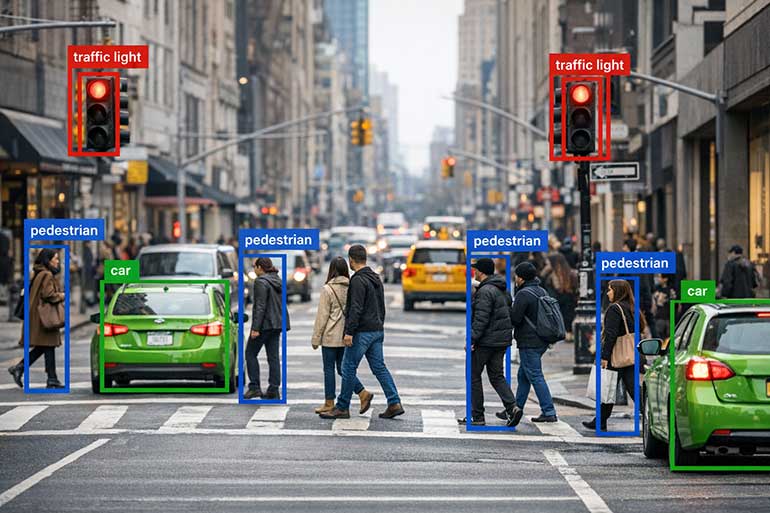
Image classification assigns a single label to an entire image. For example, labeling a photo as “cat” or “dog.”
Image annotation goes further. It identifies and locates specific objects or regions within the image using shapes, masks, or keypoints.
Classification answers “what is in this image?” Annotation answers “what is in this image and exactly where?”
Why Image Annotation Matters for Computer Vision
Computer vision models rely on supervised learning. They need labeled examples to understand patterns in visual data.
Poor annotations create noisy ground truth. This directly degrades model accuracy, increases false positives, and reduces real-world reliability.
High-quality annotation is especially critical in safety-sensitive domains. Autonomous vehicles, medical diagnostics, and surveillance systems demand near-perfect labels.

Industry insight: Teams that invest in annotation quality upfront see 15-40% fewer relabeling cycles during model iteration.
The Real Cost of Bad Annotations
A mislabeled bounding box may seem minor. But multiply that error across thousands of training images, and model performance suffers dramatically.
Relabeling an entire dataset can cost 3-5x the original annotation budget. Prevention through clear guidelines and strong QA is far more cost-effective.
Inconsistent labels also cause label drift. This happens when different annotators interpret edge cases differently, introducing systematic bias.
7 Core Types of Image Annotation
Different computer vision tasks require different annotation approaches. Choosing the right image annotation type balances accuracy, cost, and labeling speed.
1. Bounding Boxes
Bounding boxes are rectangles drawn around target objects. They define an object’s position and approximate size within the image.
This is the fastest annotation method. It works best for object detection tasks where precise shape boundaries are not critical.
Best for: Vehicle detection, pedestrian counting, retail product identification, and general object localization.
2. Polygon Annotation
Polygons trace the precise outline of irregularly shaped objects. Annotators click key vertices to create a custom boundary around each target.
This method captures object shapes more accurately than bounding boxes. It is essential when objects have complex or non-rectangular contours.
Best for: Land mapping, building detection in satellite imagery, agricultural crop boundaries, and irregular industrial parts.
3. Semantic Segmentation
Semantic segmentation assigns a class label to every pixel in an image. It creates dense, pixel-level maps of the entire scene.
All pixels belonging to the same class share a single label. For example, all road pixels are labeled “road,” regardless of how many road segments exist.
Best for: Autonomous driving scene understanding, medical image analysis, and satellite land-cover classification.
4. Instance Segmentation
Instance segmentation combines semantic labeling with individual object identification. Each object gets its own unique mask and ID.
Unlike semantic segmentation, this method distinguishes between separate objects of the same class. Two cars get two distinct masks.
Best for: Counting objects in crowded scenes, robotics grasping, and multi-object tracking scenarios.
5. Keypoint Annotation
Keypoint annotation marks specific landmark points on an object. Common applications include facial features, body joints, and hand positions.
Connecting keypoints creates skeleton structures. These enable pose estimation and motion analysis for human and animal subjects.
Best for: Facial recognition, sports analytics, physical therapy assessment, and gesture recognition systems.
6. Polyline Annotation
Polylines are sequences of connected line segments. They trace linear structures that have a defined path but no enclosed area.
This technique is ideal for marking boundaries, edges, and lane markings. It captures directional flow in transportation and infrastructure data.
Best for: Road lane detection, power line mapping, railway track identification, and sidewalk boundary marking.
7. 3D Cuboid Annotation
3D cuboids add depth estimation to bounding boxes. They represent an object’s approximate three-dimensional volume within a 2D image.
This annotation type provides spatial awareness. It helps models understand object orientation, distance, and physical dimensions.
Best for: Warehouse robotics, autonomous vehicle depth perception, and augmented reality object placement.
Annotation Type Comparison: Quick Reference
| Annotation Type | Precision | Speed | Cost | Complexity | Primary Use Case |
|---|---|---|---|---|---|
| Bounding Box | Medium | Very Fast | Low | Low | Object Detection |
| Polygon | High | Moderate | Medium | Medium | Shape-Sensitive Detection |
| Semantic Seg. | Very High | Slow | High | High | Scene Understanding |
| Instance Seg. | Very High | Slow | Very High | High | Object Counting |
| Keypoint | High | Moderate | Medium | Medium | Pose Estimation |
| Polyline | Medium | Fast | Low | Low | Lane & Edge Detection |
| 3D Cuboid | High | Slow | High | High | Depth Perception |
Image Annotation Techniques: From Manual to AI-Assisted
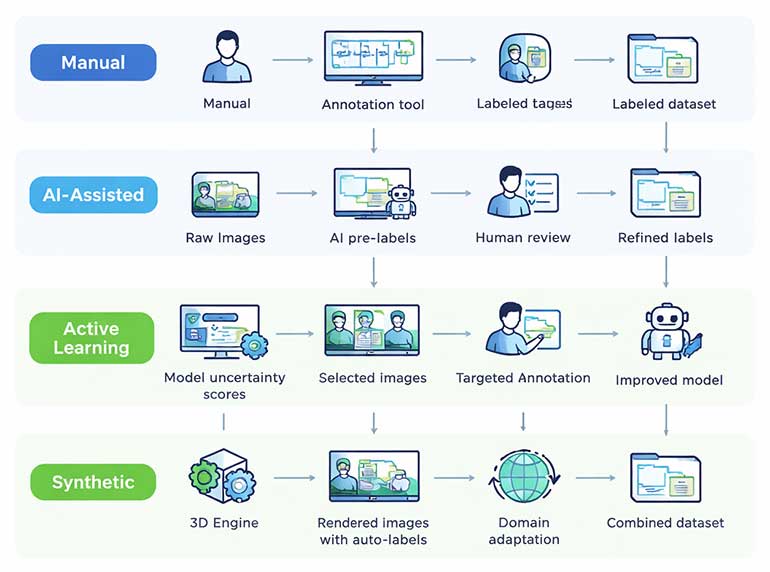
Annotation workflows have evolved significantly. Modern pipelines combine human expertise with AI-powered pre-labeling to maximize throughput and accuracy.
Manual Annotation
Human annotators label each image from scratch using annotation tools. This approach delivers the highest accuracy for complex or ambiguous images.
Manual annotation is essential for creating gold-standard datasets. These serve as benchmarks for training and evaluating AI models.
However, manual labeling is slow and expensive at scale. A single semantic segmentation mask can take 30-90 minutes per image.
AI-Assisted Annotation (Model-in-the-Loop)
AI-assisted workflows use pre-trained models to generate initial labels. Human annotators then review, correct, and refine these predictions.
This approach can reduce annotation time by 50-80%. It is particularly effective for bounding box and instance segmentation tasks.
Popular tools now integrate foundation models like Meta’s SAM 3. This model can segment any object using text prompts or example images.
2026 trend: SAM 3 recognizes over 270,000 visual concepts and generates exhaustive segmentation masks from simple text descriptions, enabling concept-first annotation workflows.
Active Learning Pipelines
Active learning selects the most informative images for human review. Instead of labeling everything, annotators focus on samples where the model is least confident.
This strategy reduces total labeling volume by 40-60% while maintaining model accuracy. It prioritizes edge cases and rare classes automatically.
Modern annotation platforms like CVAT, Labelbox, and V7 support active learning workflows natively.
Synthetic Annotation
Synthetic annotation uses generated or simulated images with automatically created labels. Virtual environments produce training data at scale without manual effort.
This method works well for augmenting real-world datasets. However, a domain gap exists between synthetic and real images.
Combining synthetic data with a small set of real annotated images often yields the best results.
How to Annotate Images: A Step-by-Step Workflow
A structured workflow ensures consistent, high-quality annotations. Here is the proven process used across production annotation projects.
Step 1: Define the Annotation Ontology
An ontology specifies all classes, attributes, and labeling rules. It acts as the single source of truth for every annotator on the project.
Include clear definitions, edge-case examples, and visual references. Ambiguous guidelines are the primary cause of inconsistent labels.
Step 2: Select the Right Annotation Tool
Choose a platform that supports your required annotation types. Evaluate tools based on AI-assist features, QA workflows, export formats, and team collaboration.
Leading platforms in 2026 include CVAT, Labelbox, V7, Supervisely, and Encord. Each has distinct strengths depending on your data type and team size.
Step 3: Configure Quality Assurance (QA)
Set up multi-pass review workflows. Common approaches include single-review, double-review, and consensus-based (majority vote) models.
Define measurable quality metrics. Key indicators include inter-annotator agreement (IAA), mean intersection over union (mIoU), and label accuracy rate.
Step 4: Annotate and Review
Annotators label images following the ontology guidelines. AI pre-labels accelerate throughput for repetitive tasks like bounding box placement.
Reviewers check a statistical sample or the full batch. They flag errors, request corrections, and escalate ambiguous cases to project managers.
Step 5: Export and Validate
Export annotations in standard formats like COCO JSON, Pascal VOC XML, or YOLO TXT. Verify format compatibility with your training pipeline before proceeding.
Run automated validation checks. These catch common errors like missing labels, overlapping masks, and class imbalances before training begins.
Download our whitepaper on: How to Annotate Images to Improve AI Model Predictions
Choosing the Right Annotation Type: A Decision Framework
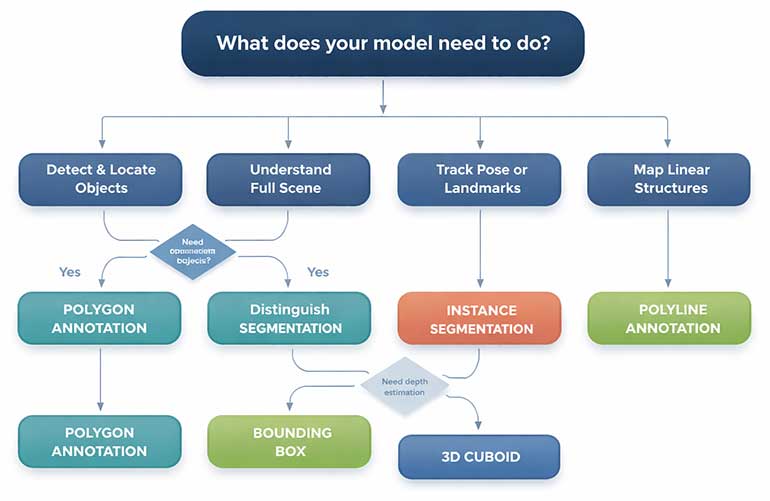
Selecting the wrong annotation type wastes time and budget. Use this framework to match your model’s requirements with the optimal labeling approach.
Decision Criteria
- Model objective: Object detection needs bounding boxes. Scene understanding needs segmentation. Pose estimation needs keypoints.
- Accuracy tolerance: Approximate localization accepts bounding boxes. Pixel-perfect boundaries demand segmentation masks or polygons.
- Budget and timeline: Bounding boxes cost 5-10x less per image than full semantic segmentation. Plan annotation budgets accordingly.
- Data volume: High-volume projects benefit from AI-assisted workflows. Low-volume, high-stakes projects may require fully manual annotation.
- Downstream evaluation metric: IoU-based metrics require tight masks. mAP-based detection metrics work well with bounding boxes.
Top Image Annotation Tools in 2026: Hands-On Comparison
The right annotation tool can dramatically improve labeling speed and consistency. Here’s how leading platforms compare based on real-world usage.
| Tool | AI Assist | Annotation Types | QA Workflow | Best For | Pricing Model |
|---|---|---|---|---|---|
| CVAT | SAM 3, custom models | Boxes, polygons, masks, cuboids, keypoints | Multi-stage review | Open-source flexibility | Free / Enterprise tiers |
| Labelbox | Model-assisted labeling | All major types + video tracking | Consensus + review queues | Enterprise ML teams | Per-seat subscription |
| V7 Darwin | Auto-annotate + SAM | Masks, keypoints, polygons, video | Built-in QA pipelines | Video-heavy projects | Usage-based pricing |
| Supervisely | Neural network server | Segmentation, cuboids, point clouds | Custom QA steps | 3D / point cloud data | Free tier + Enterprise |
| Encord | AI pre-labels + DICOM | Boxes, polygons, masks, DICOM | Automated audits | Medical imaging teams | Custom enterprise pricing |
No single tool fits every project. Evaluate based on your annotation types, team size, security requirements, and integration needs.
Practitioner tip: Run a 500-image pilot with your top 2 tool candidates. Measure annotation speed, QA pass rate, and export compatibility before committing.
Image Annotation Applications Across Industries
Image annotation powers computer vision in virtually every sector. Here are the highest-impact applications with specific annotation requirements.
Healthcare and Medical Imaging
Medical image annotation supports disease detection, surgical planning, and diagnostic assistance. Radiologists label tumors, organs, and abnormalities in X-rays, CT scans, and MRIs.
Polygon and semantic segmentation annotations are most common. Pixel-level precision is critical for identifying tumor boundaries and tissue classification.
HIPAA compliance and data security are non-negotiable requirements for medical annotation projects.
Autonomous Vehicles and ADAS
Self-driving systems require annotated data for pedestrians, vehicles, lane markings, traffic signs, and road surfaces. Annotation accuracy directly impacts passenger safety.
Projects typically combine bounding boxes for object detection with semantic segmentation for scene understanding. LiDAR point cloud annotation adds 3D spatial awareness.
Annotation volume is massive. A single autonomous vehicle generates terabytes of visual data daily.
Ecommerce and Retail
Product image annotation enables visual search, recommendation engines, and automated catalog management. Models learn to recognize product attributes from labeled images.
Bounding box annotation handles product detection. Keypoint annotation maps product features like collar type, sleeve length, and shoe style.
Fast turnaround matters. Seasonal catalogs with thousands of new SKUs need rapid annotation cycles.
Agriculture and Precision Farming
Aerial and satellite image annotation supports crop monitoring, weed detection, and yield estimation. Drones capture field images that AI models analyze for actionable insights.
Semantic segmentation distinguishes crops from weeds at pixel level. This guides precision spraying systems, reducing pesticide use and operational costs.
Manufacturing and Quality Control
Defect detection on production lines uses annotated images of acceptable and defective products. Models learn to flag anomalies in real-time.
Annotation requirements vary by defect type. Surface scratches need polygon annotation. Dimensional errors need keypoint marking.
Finance and Security
Facial recognition for identity verification relies on keypoint annotation. Banks and fintech companies use annotated face data for secure authentication.
Document annotation extracts structured data from receipts, invoices, and checks. OCR models need bounding box labels around text regions.
10 Image Annotation Best Practices for Production Quality
Quality annotation requires disciplined processes. These best practices are drawn from managing thousands of annotation projects at scale.
1. Write Exhaustive Annotation Guidelines
Create a detailed guide with class definitions, edge-case rules, and visual examples. Update it continuously as new ambiguities emerge during labeling.
Poor guidelines cause more quality issues than unskilled annotators. Invest time in documentation before annotation begins.
2. Label Objects in Their Entirety
Always annotate the full extent of an object, even if parts are occluded. Draw bounding boxes or masks as if the hidden portion were visible.
Partially labeled objects confuse models during training. They learn incorrect boundaries and produce unreliable detections.
3. Handle Occlusion Consistently
Define clear rules for overlapping objects. Specify whether annotators should draw overlapping masks or stop at visible boundaries.
Consistency matters more than any single rule choice. All annotators must follow the same occlusion handling approach.
4. Use Specific, Hierarchical Class Names
Prefer specific labels over generic ones. Label “Friesian cow” instead of just “cow” when the distinction matters for your model.
Build a class hierarchy. Start broad and add specificity as your model and dataset mature.
5. Measure Inter-Annotator Agreement (IAA)
Have multiple annotators label the same images independently. Compare their outputs to identify systematic disagreements.
Low IAA scores signal unclear guidelines or insufficient training. Address root causes before scaling annotation volume.
6. Implement Multi-Stage Quality Review
Use at least a two-pass review process. The first annotator labels. A second reviewer verifies. A third escalation path handles disputes.
Automated QA checks can flag obvious errors. These include missing labels, labels outside image bounds, and extreme aspect ratio bounding boxes.
7. Run Small-Scale Pilots First
Annotate 200-500 images before committing to a full project. Train a sample model and evaluate performance on these initial labels.
Pilots reveal ontology issues, guideline gaps, and tool limitations early. Fixing problems at small scale saves significant time and cost later.
8. Leverage AI Pre-Labeling Strategically
Use model-assisted pre-labels for repetitive tasks. But always require human review. Unchecked AI labels can propagate systematic errors.
AI pre-labels work best for common classes
9. Maintain Class Balance in Your Dataset
Monitor class distribution throughout annotation. Severe imbalances cause models to favor majority classes and miss rare but important objects.
Use stratified sampling or targeted annotation campaigns to address underrepresented classes.
10. Version Control Your Annotations
Track annotation versions alongside model versions. When you retrain with updated labels, maintain clear records of what changed and why.
Version control enables reproducibility. It also helps diagnose model performance regressions caused by annotation changes.
Image Annotation Challenges and How to Overcome Them
Challenge: Scaling Without Losing Quality
As project volume grows, quality tends to degrade. Larger teams introduce more variability in annotation style and accuracy.
Solution: Standardize with gold-standard test sets. Regularly evaluate annotator performance against these benchmarks.
Challenge: Managing Annotation Costs
Pixel-level annotation is expensive. Semantic segmentation costs 10-20x more per image than bounding box annotation.
Solution: Use a tiered approach. Apply cheap, fast annotations for simple objects. Reserve expensive techniques for critical classes.
Challenge: Handling Edge Cases and Ambiguity
Real-world images contain ambiguous objects, unusual viewpoints, and partial visibility. Annotators often disagree on these cases.
Solution: Build an edge-case gallery. Document decisions for every ambiguous scenario and share them across the team.
Challenge: Bridging the Domain Gap with Synthetic Data
Models trained on synthetic data often underperform on real images. Visual differences between rendered and photographed scenes cause mismatches.
Solution: Use domain adaptation techniques. Fine-tune on a small set of real annotated images to bridge the gap.
Key Quality Metrics for Image Annotation Projects
Measuring annotation quality objectively ensures your training data meets production standards. Track these metrics consistently.
| Metric | What It Measures | Target Benchmark |
|---|---|---|
| Inter-Annotator Agreement | Consistency between different annotators on the same data | > 0.85 Cohen’s Kappa |
| Mean IoU (mIoU) | Overlap between predicted and ground-truth segmentation masks | > 0.75 for production use |
| Label Accuracy Rate | Percentage of labels matching gold-standard references | > 98% for safety-critical |
| Annotation Throughput | Images or annotations completed per hour per annotator | Varies by annotation type |
| QA Rejection Rate | Percentage of annotations sent back for correction | < 5% after ramp-up |
| Edge Case Resolution Time | Time to document and resolve ambiguous labeling decisions | < 24 hours turnaround |
Poor labels don’t just hurt accuracy – they multiply costs across your entire ML pipeline. See how annotation is driving AI innovation across emerging industries in our free whitepaper.
Download the free whitepaper now »The Future of Image Annotation: What’s Changing in 2026 and Beyond
Foundation Models Are Transforming Annotation Speed
Meta’s SAM 3 can segment over 270,000 visual concepts from text prompts alone. It delivers exhaustive masks for all matching objects in a single inference pass.
This shifts the annotator’s role from drawing shapes to verifying AI-generated labels. Human effort focuses on correction rather than creation.
SAM 3.1 further improves multi-object tracking efficiency with shared-memory processing. Real-time annotation of video data is becoming practical.
Concept-First Labeling Replaces Click-Based Workflows
Traditional annotation requires clicking on each object individually. Concept-first labeling lets annotators specify what to label using natural language.
Type “yellow school bus” and the model finds and segments every matching instance. This approach reduces manual effort on large, repetitive datasets.
Domain Expert Annotation Is Rising
Generic crowdsourced labeling is giving way to specialized annotation by domain experts. Medical images need radiologists. Legal documents need attorneys.
Expert annotators deliver higher label accuracy for complex tasks. They also resolve edge cases faster, reducing QA cycles and total project duration.
Quality Over Quantity Is the New Standard
Smaller batches of expertly annotated data can outperform massive noisy datasets. The industry is shifting toward “smart data” strategies.
Active learning pipelines select only the most informative samples for labeling. This maximizes model improvement per annotation dollar spent.
Should You Outsource Image Annotation or Build In-House?
Both approaches have clear advantages and tradeoffs. Your choice depends on project scale, domain complexity, and long-term annotation volume.
When In-House Annotation Makes Sense
- Your data is highly sensitive (medical, military, financial) and cannot leave your infrastructure.
- You need deep domain expertise that is difficult to transfer to external annotators.
- You have consistent, long-term annotation volume that justifies building a dedicated team.
- You require tight integration between annotation workflows and your ML training pipeline.
When Outsourcing Annotation Makes Sense
- You need rapid scale-up for a large project without hiring and training a new team.
- Your annotation tasks are well-defined with clear guidelines that external teams can follow.
- You want to reduce fixed overhead costs and convert annotation into a variable expense.
- You need coverage across multiple annotation types and cannot justify specialized in-house hires for each.
The Hybrid Model: Best of Both Worlds
Many teams use a hybrid approach. They maintain internal ownership of ontology design, guidelines, and QA standards while outsourcing image annotation.
This model combines the quality control of in-house management with the scalability of external annotation partners.
Decision factor: If your project exceeds 10,000 images and your internal team lacks annotation infrastructure, outsourcing execution while retaining QA ownership is typically the most cost-effective approach.
Conclusion: Build Better AI with Better Annotations
Image annotation is the foundation of every successful computer vision project. It determines your model’s accuracy, reliability, and real-world performance.
Investing in clear ontologies, rigorous QA, and the right annotation tools pays dividends throughout your entire ML pipeline.
The annotation landscape is evolving rapidly. Foundation models like SAM 3 are accelerating labeling speed. But human expertise remains irreplaceable for quality assurance.
Choose the right annotation type for your task. Implement best practices from day one. And measure quality objectively at every stage.
Your computer vision model can only be as good as the data it learns from. Make every annotation count.
Frequently Asked Questions About Image Annotation
Costs vary widely by annotation type and complexity. Bounding box annotation typically costs $0.02-$0.10 per object. Semantic segmentation ranges from $0.50-$6.00 per image.
Factors include image complexity, number of classes, QA requirements, and turnaround time. Request pilot pricing from vendors before committing to large contracts.
The terms are often used interchangeably. Technically, labeling assigns a category to the entire image. Annotation adds spatial information by marking objects within the image.
In practice, most professionals use “annotation” and “labeling” as synonyms when discussing computer vision training data.
Speed depends on annotation type. Bounding boxes average 3-8 seconds per object. Polygon annotation takes 30-60 seconds per object. Full semantic segmentation can take 15-90 minutes per image.
AI-assisted pre-labeling reduces these times by 50-80% for repetitive tasks.
CVAT is the most recommended starting point. It is free, open-source, supports all major annotation types, and has strong community documentation.
For teams needing managed features, Labelbox and V7 offer intuitive interfaces with built-in onboarding workflows.
Not yet. AI pre-labeling handles common objects well, but human review remains essential for edge cases, rare classes, and quality assurance.
The trend is toward human-AI collaboration. AI handles the bulk labeling. Humans verify, correct, and handle the long tail of difficult cases.
Implement gold-standard test sets, inter-annotator agreement scoring, multi-stage reviews, and automated validation checks.
Regular annotator calibration sessions maintain consistency as teams grow. Address guideline ambiguities immediately when they surface.
Ready to Scale Your Image Annotation Projects?
HabileData’s team of 300+ trained annotators delivers pixel-accurate labels across bounding boxes, polygons, segmentation masks, keypoints, and 3D cuboids. With 6,500+ completed projects and 99.5% accuracy benchmarks, we help ML teams ship production-ready models faster.
Contact our annotation experts for a free project assessment »


Snehal Joshi , Head of Business Process Management at HabileData, leads a 500-member team of data professionals, having successfully delivered 500+ projects across B2B data aggregation, real estate, ecommerce, and manufacturing. His expertise spans data hygiene strategy, workflow automation, database management, and process optimization - making him a trusted voice on data quality and operational excellence for enterprises worldwide. 🔗Connect with Snehal on LinkedIn