

Data scrubbing is essential for organizations to make informed business decisions and avoid costly errors and missed opportunities. Data scrubbing ensures that data remains clean and fit for any business analysis. Missing out on data scrubbing schedules can damage a company’s revenue and even credibility.
Contents
- What is data scrubbing?
- Data scrubbing vs. data cleansing vs. data wrangling: what’s the difference?
- Why does data go dirty? Root causes and common error types
- 7 common data errors in your database
- Signs your database needs scrubbing right now
- How to scrub your database: A step-by-step process
- Data scrubbing by industry: what changes and what doesn’t
- Best data scrubbing tools in 2025: comparison and use cases
- In-house data scrubbing vs. outsourcing: how to decide
- Data scrubbing and data privacy compliance: GDPR, CCPA, and HIPAA
- The real cost of dirty data (and the ROI of scrubbing it)
- AI-powered data scrubbing: how machine learning is changing data quality
- Conclusion
- FAQ
B2B decays at the rate of 30% annually. If your company has 100,000 contacts, then 30,000 records will become inaccurate every year. 2,500 records per month and 80 records would decay every single day. Imagine how your marketing team would perform with such data. The campaigns will fail but for no fault of your marketing team.
With contact data being dynamic, the records keep changing at a fast pace. Designations change, companies relocate, phone numbers change, emails get invalid and other details may become outdated. To keep your data accurate, updated and enriched all the time, you need to invest in data maintenance.
If data maintenance is not done, your campaigns will misfire. Your SDRs make calls to wrong people, your campaigns land on mis-segmented accounts as your firmographic data was not mapped. All this leads to operational inefficiency and can affect your reputation and market credibility.
There is an urgent need to invest in data cleansing services. This is not a onetime process. It must be done continuously so that at no point in time your data is dirty or unusable. Poor data quality costs U.S. businesses $3.1 trillion annually, with individual organizations losing $12.9 to $15 million per year through wasted marketing spend, lost sales opportunities, and operational inefficiencies.
Here in this guide, we will cover the process behind data scrubbing, challenges, compliance and tooling decisions. This will help you decide a sequence you must follow to keep your data clean and updated.
What is data scrubbing?
Data scrubbing does a systematic identification of errors in your records and corrects them at the same time. Any duplicate records, format inconsistencies, missing values, or obsolete records are all identified and fixed. The process doesn’t end with just fixing. After the records have been updated, they are finally validated and verified against trusted sources ensuring complete data accuracy.
The process makes your data accurate, consistent and ready for informed decision making. It is not a one-time task. It is an ongoing process, and you also need to maintain good data hygiene practices and follow data cleansing tips apart from partnering with a good data cleansing partner.
But a data cleansing service provider will not fix structural schema design flaws, semantic labeling errors in taxonomy, or data architecture problems. Those require data engineering work, not scrubbing.
Data scrubbing vs. data cleansing vs. data wrangling: what’s the difference?
These are completely different techniques though they are often used interchangeably. But they have different scopes and different purposes. Understand your needs before using any of them.
| Term | Scope | When to Use It |
|---|---|---|
| Data Scrubbing |
Detecting and correcting errors in existing records:
|
|
| Data Cleansing |
Broader quality improvement that includes:
|
|
| Data Wrangling |
Full transformation pipeline:
|
|
Why does data go dirty? Root causes and common error types
77% of organizations report data quality problems, impacting 91% of their performance. The reason why your data gets dirty are many. In fact, data starts degrading from the moment it enters your system. But one can easily predict certain sources of your data getting dirty. If you understand the reasons behind your data getting dirty, you can stay cautious and address them in the first place.
But unfortunately, 57% of businesses find out about dirty data when it’s reported by customers or prospects. And by this time, it gets difficult to track down and solve essential data issues, as the data has already become very messy.
Data entry errors are the most common cause of data issues with 60% of dirty data cases emerging from human error. While keying in the data the data entry operators must be careful about typos, field selection, naming conventions and other such details. Any mistake that enters at this stage grows silently, making the data inaccurate.
Secondly, if data migration is not done with care, the data, even if it looks correct it may not be stored correctly, again creating mismatches. For example, you moved the phone number correctly but stored it in the field of zip code. So, your data is correct but stored in the wrong column. You need to be extra careful during data migration and integration and ensure that they align well and are stored in the correct format and fields.
A real-world disaster was Australia’s Queensland Health payroll migration, where inadequate data prep led to 35,000 payroll errors in the first month from dirty data issues.
And the most important point is about doing constant verification. B2B data decays at a very fast rate, roughly 25-30% per year. Phone numbers change, people change jobs, offices relocate, and so a contact list that you scrubbed clean a few months back may not be the same.
Errors also creep in when your data is aggregated from multiple sources into a shred data warehouse. You may end up collecting different versions of same customer contacts. All three versions may not be 100% accurate. It is important to integrate validation rules at the point of entry itself so that errors are caught at the initial stage itself.
7 common data errors in your database
| Error Type | Example | Business Impact |
|---|---|---|
| Duplicates | “Acme Corp” + “ACME Corporation” stored as two records for one company |
|
| Format Inconsistencies | Phone stored as “+1-800-555-0100” in one record, “18005550100” in another |
|
| Missing Values | Email field blank in 18% of CRM records |
|
| Outdated Records | VP title unchanged 14 months after employee left the company |
|
| Cross-Field Contradictions | US ZIP code in a record flagged as a UK address |
|
| Non-Standard Categories | “Healthcare” + “Health Care” + “Medical” stored as separate industry tags |
|
| Referential Integrity Errors | Invoice record linked to a deleted customer ID |
|
Signs your database needs scrubbing right now
You have scrubbed your data clean, but you still need to stay alert all the time. Data quality degrades slowly but gradually. And, even before you realize you may reach a situation where your campaigns will start failing, sales teams will start complaining, and reports may not match. Why to wait for such a situation?
Incomplete information, duplicate records, inconsistent data formats, outdated information, and user complaints are the 5 signs your data needs a deep clean.
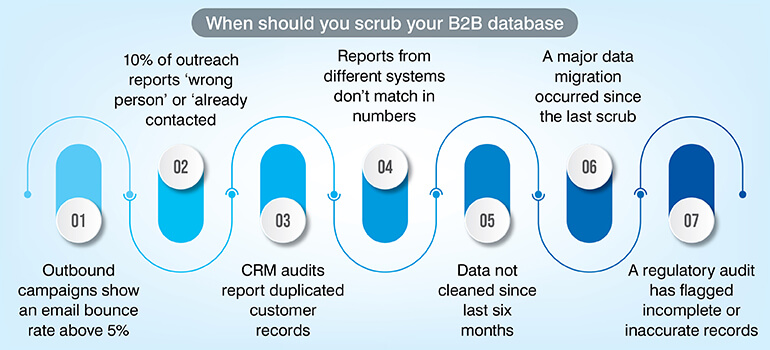
If this sounds familiar take immediate action as your revenue and compliance both may be in danger.
Not sure how clean your data really is?
Audit Now »How to scrub your database: A step-by-step process
Here is the eight-step process that you must follow regardless of any industry you belong to. This is applicable to product catalogs, financial reports, or even patient data. It is important to follow the same sequence for complete and accurate data scrubbing.
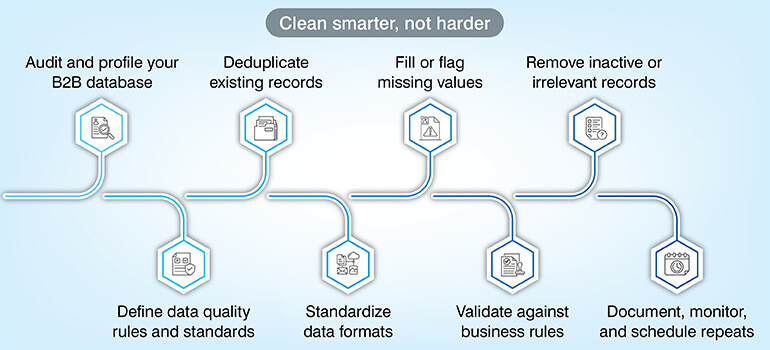
Step 1 – Audit and profile your data
Before you start the cleaning process, assess the data quality. You can use CRM reports, Google Sheets where simple formulas like COUNTIF can be used or even tools for large databases. Create a scorecard fixing a benchmark for each parameter as % of missing data, duplicate rate or format consistency.
This becomes your baseline and a measurement tool that you can use to measure improvement. This baseline acts as your reference point.
Step 2 – Define data quality rules and standards
Before you start the cleaning process it is important to define what clean data means to your organization. Once you define the standard, it gets easy for all to follow the rule instead of each having their own meaning of clean data. Document clearly that email fields should match RFC 5322 format or phone numbers must conform to E.164 international standard.
Dates must follow a set standard, and addresses must be checked against a postal API. This will ensure that all corrections made are consistent and reliable. The corrections no longer stay subjective and becomes repeatable.
Step 3 – Deduplicate records
Once you set the rules, and before you move ahead, check for duplicates. Duplicate records harm your campaigns in many ways as the same customer will appear multiple times, and you end up sending multiple emails to the same person. Run exact match first to find exact duplicates and then fuzzy match for near duplicates.
Once duplicates are identified set rules to decide which record to keep and which you must delete from the system. But don’t delete blindly as you may lose important contacts. It is better to merge all where all data gets consolidated in a single record.
Step 4 – Standardize formats
Now that you have resolved the issue of duplicates you must ensure that the data format is consistent across all fields. Data may be factually correct but written in different formats can create confusion. Phone number, date, country, and company name all must have consistent formats.
The format you must follow could be E.164 for phone numbers, ISO 8601 for dates, ISO 3166-1 alpha-2 for country codes and title case for company names. Technical teams can use scripts (regex) while for non-technical ones you can use Excel/Sheets to automatically standardize large datasets.
Step 5 – Fill or flag missing values
Missing fields can play havoc with your dataset, and they need immediate handling. There are three ways you can handle this but never do any guesswork or add values on your own. The first option is to look for missing data from verified sources and update it. If that is not possible, mark it to be checked instead of leaving it blank. Lastly, clearly indicate that the data is unavailable.
Step 6 – Validate against business rules
Even if your data looks correct individually, it can still not be correct if the fields don’t match. You need to check relationships between fields like the ZIP code must match the state or correct data should be in a field marked for date. Apart from field matching, you must also check for the range like the age field cannot be zero and revenue also should be within the defined range.
Do auto correction wherever possible, flag for future review and reject the records where the correction is not possible.
Step 7 – Remove inactive or irrelevant records
Don’t delete records blindly. Be clear on what inactive means before you decide on deleting any records. For example, a healthcare record may be inactive for long years but still may have legal retention values; on the other hand a sales lead not working can be easily archived. Never delete permanently.
Have a storage policy where you retain old records which you may require later for audit inquiries. Even regulations like GDPR and HIPAA often require old documents.
Step 8 – Document, monitor, and schedule repeats
And lastly, most important always get an output report that clearly records what happened in the data cleaning process. A report that clearly defines the number of records processed, error identification, corrections, review and archived reports document the work done.
This report will help measure improvement and will help plan cleaning frequency. Regular data cleansing schedule must be maintained especially after a bulk data migration.
Want to implement this process without trial and error?
Start Setup »Data scrubbing by industry: what changes and what doesn’t
The basic data scrubbing process remains same, but certain validation rules, compliance and obligations change from industry to industry.
Healthcare: patient record accuracy and HIPAA compliance
According to Ponemon Institute research, 54% of healthcare vendors have experienced at least one data breach exposing protected health information (PHI). The average cost of a healthcare vendor data breach is $2.75 million, with nearly 10,000 records exposed per breach.
Healthcare industry needs to be especially careful with records like patient ID where any kind of duplication can create care fragmentation that could be dangerous for patient care. ICD -10 and CPT code validation, insurance ID accuracy all must be carefully authenticated. HIPPA guidelines also require accurate medical records for compliance.
Finance and banking: risk, fraud, and regulatory reporting
Financial services face critical challenges with 66% of banks struggling with data quality and integrity issues according to Mosaic Smart Data’s 2026 survey. Financial services must follow strict rules like KYC (Know Your Customer) and AML (Anti-Money Laundering) for which accurate data is very important. Customer ID, address must be correct and standardized. There should be no duplication of any transactional data. All records must clear the regulatory audits.
E-commerce and retail: product data and customer records
Customer data and product data are almost the pillars of e-commerce. The data must be accurate and standardized for optimum performance. Naming conventions, size codes, SKU format all must be consistent. This is also essential for inventory management systems to work efficiently. Customer data also must be scrubbed to avoid any duplication or address mismatch. Any inaccuracy results in failed deliveries, returns and customer churn.
Marketing and CRM: deliverability and segmentation accuracy
Bad data impact shows in a very measurable way and immediately in the field of marketing and CRM. Campaign results start showing a downfall. Any duplicate entry will make you send same email twice increasing your cost with negative impact.
With non-validated data you send marketing mails to people who have not opted for it, and you end up in compliance issues. Outdated emails will increase bounce rates, and you may get flagged by email providers. Suppose you have 100,000 contacts and 10% are duplicate then you have 10,000 useless contacts and if your cost per mail is $0.10, you waste $1,000. Annual wasted cost would be $12,000.
Manufacturing and supply chain: inventory and vendor data
In manufacturing, poor data directly disrupts operations like procurement and production. Any inaccurate data can lead to major issues in the supply chain. If your vendor records are not correct you may have order delays, incorrect inventory may land you with over stock or under stock and wrong part specifications result in defective piece or reworks. Every detail must be checked and standardized like if you have a stock of spare parts, it must be listed consistently or else it leads to duplicate inventory or wrong orders.
Best data scrubbing tools in 2025: comparison and use cases
| Tool | Best For | Key Features |
|---|---|---|
| Hevo Data | Cloud data pipelines with built-in quality checks |
|
| Winpure | CRM and marketing list deduplication |
|
| Cloudingo | Salesforce-native deduplication |
|
| Trifacta Wrangler | Complex data transformation and scrubbing |
|
| Data Ladder | High-volume record matching and deduplication |
|
| OpenRefine | Free, open-source scrubbing for technical teams |
|
How to choose the right data scrubbing tool for your use case
Based on your project needs, volume and compliance requirements choose the appropriate tool. Be clear on the following points before you make a choice.
- Check your dataset size. For under 50K records use Excel or OpenRefine and if it exceeds 500K records tools that support bulk processing is suitable.
- Is it one time process or continuous monitoring? A manged service or OpenRefine works well for one time project while for constant monitoring a platform with scheduled alerting works best.
- Assess your team’s technical capability. Certain tools require scripting knowledge like Trifacta while tools like Winpure suits non-technical team.
- If you have compliance requirement then check for tools that support audits.
Data scrubbing tools do a great supporting job in data cleaning process, but they have their own limitations. These tools follow a predefined logic and often struggle with complex real-world variations. They just execute and don’t have the capacity to audit or review. That is the reason a hybrid approach which combines automation with expert validation ensures higher accuracy. Outsourcing ensures you have access to domain experts, multi-level quality assurance and you can scale on demand.
In-house data scrubbing vs. outsourcing: how to decide
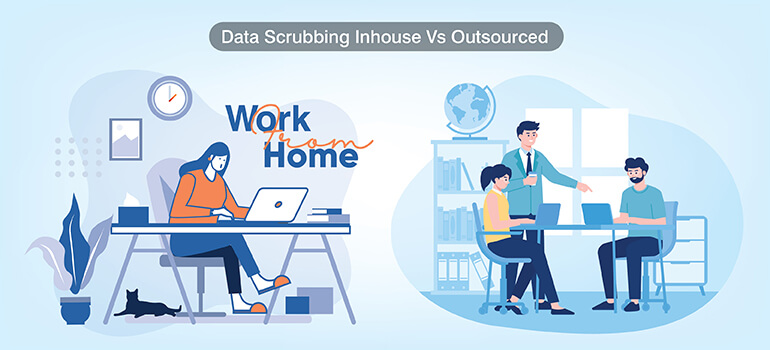
Both approaches have their own plus points. Based on your requirement, capability, compliance needs and dataset complexity take a call.
| Factor | In-House | Outsourced |
|---|---|---|
| Dataset size | Best for <100K records | Better for 100K+ or multi-system consolidation |
| Cost structure | Staff time + tool licenses (fixed) | Per-record or project-based (variable) |
| Time to completion | Slower – depends on internal bandwidth | Faster – dedicated team and tooling |
| Ongoing vs. project | Sustainable for recurring maintenance | Most efficient for one-time legacy cleanup |
| Control | Full control over rules and decisions | Requires clear SOP and review checkpoints |
| Domain expertise | Dependent on internal data team quality | Specialized expertise, particularly for compliance-heavy verticals |
Based on your needs if it works for you, hybrid model is also an option. If your team has the domain expertise that is needed for your project, you can define the quality required while the external team can execute the project.
Still deciding between in-house and outsourcing?
Get Advice »Data scrubbing and data privacy compliance: GDPR, CCPA, and HIPAA

Compliance is no more optional for data scrubbing programs; it is now a mandatory requirement. Any inaccuracy in personal data is considered a compliance failure by regulators in the US, UK and EU.
As per (Article 5(1)(d)) personal data must be accurate all the time. Any inaccuracy must be addressed without any delay. Therefore, the organizations need to take this seriously and take immediate action before any complaint is registered.
It is not only about keeping the customer data accurate, CCPA has a right to deletion where if a customer wants the personal data to be deleted that must be honored. A scrubbing SOP that does not include suppression list management is incomplete under CCPA.
An inaccurate patient data in healthcare is not just a mistake; it is a compliance issue. HIPAA mandates that patient (PHI) data must be accurate and complete. Any data mismatch like wrong date of birth, duplicate MRN etc. is a serious issue under this compliance.
The real cost of dirty data (and the ROI of scrubbing it)
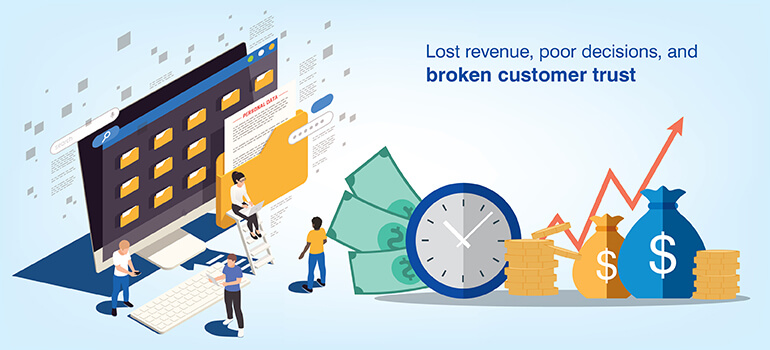
Poor quality data costs an average of $12.9 million per year as per a Gartner report. This data is about the visible losses that can be measured like fixing errors, rework and operational delays. But the damage is much more than this. This excludes other losses like missed opportunities, slow execution and loss of trust.
The loss can be divided into five categories. Wasted expense on marketing, cost on failed deliveries, compliance fines, calling same person twice due to duplicate records and wrong business decisions. Together these create an impact where the financial loss is much than what is visible.
If you calculate the ROI you will be surprised by the revenue loss you incurred due to bad data. Suppose you have a contact list of 200,000 contacts where 12% is duplicate. This makes 24,000 contacts as duplicates. Contacting these contacts will not get you any results or may even harm your credibility. You also waste around $2,400 sending mails to these duplicate contacts assuming sending one mail costing $0.10.
If you compare this with data scrubbing cost, it is around $1,500 which you spend once and save $2,400 per campaign. And if your campaigns run weekly, imagine how much money you would be wasting.
How much does data scrubbing cost?
Data scrubbing cost depends on the model you choose. In-house scrubbing will cost you the team cost and tools while if you outsource the cost may be calculated either on per record or project cost.
In-house involves multiple factors like your staff time, tool licensing cost, infrastructure, overhead cost and other similar expenses. Suppose you have 50,000 records to clean with an effort of 20 hours; it approximately should cost you $1,200 (excluding tools). And if the complexity increases the cost would also go up.
Outsourcing structure will be different. You are charged per records or per project and typical cost per record ranges between $0.02 to $0.15 per record. Of course, the pricing would vary based on the complexity, number of fields, level of validation needed and compliance requirements.
If we take an outsourcing cost example, if your records are not complex then 100,000 records at the rate of $0.05 would cost $5,000. With complexity the rate would increase to $0.08–$0.15 per record. Advanced validation, compliance checks and audits justify the higher cost.
If you require one time clean up, you pay a fixed project cost while for ongoing maintenance you can opt for monthly retainer. Managed services include continuous monitoring and periodic scrubbing. To give you a quick guideline, if you have a small dataset, in-house is a good option. For large and complex datasets outsourcing is fast and reliable. And finally for compliance heavy industries look for specialized service provider.
AI-powered data scrubbing: how machine learning is changing data quality

Machine learning (ML) helps fix complex data problems that simple rules cannot handle. Earlier we used rule-based scrubbing which worked for exact matches, but it did not work in case of messy or inconsistent data. This is where machine learning supports. ML understands the context, not just exact matches.
What ML can identify, simple rules would completely miss. Fuzzy duplicate detection detects duplicates that are similar but not identical. While ML understands the spelling variations and even phonetics to find exact duplicates. It even flags data that looks unusual compared to the rest. ML can clearly define what doesn’t look right which is not possible with rules. Also based on the last activity date and churn trends ML can predict which data is likely to get outdated.
Tools these days use AI/ML to clean data, each suited for different environments. Tools like Salesforce Einstein, which is CRM focussed detects duplicates, suggests merges and even enriches missing data. Informatica works best for enterprise data teams which cleans and standardizes massive datasets. It uses AI to detect patterns and anomalies. OpenRefine is a open-source free tool best suited for analysts and smaller teams.
Even the best AI tools can make wrong decisions if the data they learn from is flawed, so human oversight is still essential.
Conclusion
Data quality is a business priority as it directly impacts your revenue, market growth and trust. If not checked on time dirty data compounds over time where small errors become major operational risks. It is important to check data quality at the entry level rather than fixing it later. Fixing data quality later costs much more than fixing it on time. Improving your data quality requires expertise, documented standards, established processes and technology. It cannot be done passively.
Data scrubbing tools do help but automation has limits. Also, AI models depend on accurate data to deliver results. Hybrid approach works best in such a scenario. Automation combined with human inputs ensure data that is reliable and accurate. Outsourcing is a good option where domain experts, dedicated team along with QA frameworks drive good results.
It is a great idea to keep an eye on your data quality. Data audit on a regular basis will help you keep a good track of your data quality. Clean data is no more just an operational hygiene; it defines the quality of all your business operations and impacts your revenue.
Ready to improve your data quality at scale?
Contact Us »Frequently asked questions about data scrubbing
Data scrubbing and data cleansing are similar with a difference in scope. Data scrubbing detects and corrects errors in the existing data while data cleansing does data scrubbing along with enriching the data. It also takes care of compliance and monitors ongoing data quality. Data cleansing is the umbrella where data scrubbing is a part of it.
How frequently you run data cleaning depends on how fast it changes and how it is used. Since CRM and marketing data changes very fast you must plan a monthly data cleansing process. Financial data being more stable can be done quarterly. Product catalogs don’t change daily but bulk updates can introduce errors. It is a good idea to clean up after major or bulk updates. As a rule, dataset must be cleaned after major updates and system migrations.
Data get dirty due to many reasons. The first one happens during the data entry stage where typos, wrong field selection or inconsistent naming can add errors in the system. Though this may look small, but this adds up to major data issues. Secondly if you are not careful data errors creeps in during data migration, when data moves between systems. And thirdly data naturally decays over time. Often people change jobs, companies get relocated, phone numbers changes and things like this naturally makes clean data dirty.
Yes, data can be easily cleaned in excel but it has a limitation. It can be done only for small data cleaning tasks. With dataset under 50,000 rows, you can use functions like trim/clean, proper to fix capitalization, remove duplicates and VLOOKUP / MATCH to compare and validate data across columns. Excel has scale limitation and has no standard workflow. Even audit trail record is not available in excel. You must move to dedicated tools once your data gets large and you require consistent and repeatable processes.
Data scrubbing and ETL are related but they do different jobs. ETL takes data from the source, transforms it while data scrubbing improves data quality. Data scrubbing fixes errors, duplicates and checks for format consistency. ETL moves and prepares data; data scrubbing ensures that data is accurate and reliable.
In healthcare data cleaning is mandatory to ensure patient safety and legal compliance. Any inaccuracy in patient data can prove dangerous as doctors may see wrong or incomplete reports risking wrong treatment. The ICD-10 and CPT codes need validation as wrong codes can lead to billing errors. Any error is patient records like date or birth can lead to patient mix-ups and may even create insurance claim issues. So healthcare data cleaning is more serious than any normal data cleaning as any mistake here can jeopardize patient’s health. Also, it is a mandatory requirement by HIPAA.



Snehal Joshi , Head of Business Process Management at HabileData, leads a 500-member team of data professionals, having successfully delivered 500+ projects across B2B data aggregation, real estate, ecommerce, and manufacturing. His expertise spans data hygiene strategy, workflow automation, database management, and process optimization - making him a trusted voice on data quality and operational excellence for enterprises worldwide. 🔗Connect with Snehal on LinkedIn