
Product catalogs must be accurate, complete and enriched to improve customer experience and support quick buying decisions. A well optimized product catalog is the key to improving product discoverability, increasing customer engagement and conversions.
Contents
Just because your store is stocked and pricing is competitive, may not be enough to drive conversions. Your ecommerce product catalogs need to be optimized in a way that customers can discover and compare products with ease across all channels.
An average of 23% of potential revenue is lost to bad product data. And how do you fix this? The loss has nothing to do with competition or pricing. The culprit remains your very own data. What you need is accurate product catalog optimization.
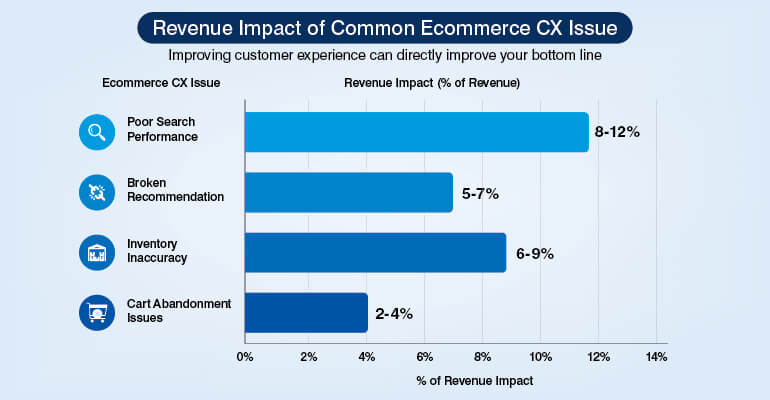
Issues like inventory inaccuracy, poor data discoverability or cart abandonment are directly the fallout from poor product optimization. And this impacts conversions and customer retention. Businesses lose up to 11% of their annual revenue due to poor inventory management.
If you are handling large product catalogs, optimization is an absolute must. It is essential to deliver consistent ecommerce CX across channels. Ecommerce catalog management services can support your data optimization.
Read this blog to understand 8 ways to optimize ecommerce product catalogs for better CX and improved business operations.
Poor catalog data hurts conversions.
Optimize your catalog »Why ecommerce industry need catalog optimization?
Ecommerce industry needs catalog optimization to build customer-centric navigation that improves CX. Poorly optimized product listings drive abandonment rates as high as 70% as reported by Baymard Institute. To check this, it is critical for the industry to invest in customer experience (CX) optimization.
Catalog optimization needs proper management. If not optimized well, it may not deliver the right response. A customer looks for quick discoverability and better filtering to pick the product they are looking for.
Only when your products are listed and structured properly, they can support better filtering and consistent product information. Poor optimization leads to poor customer experience.
This reduces any kind of conflicts and strengthens trust and credibility. A well optimized product catalog improves customer experience and conversions. And if the optimization is not done well, it directly hits your revenue across many areas. You could have issues like cart abandonment, inventory inaccuracy or poor search performance.
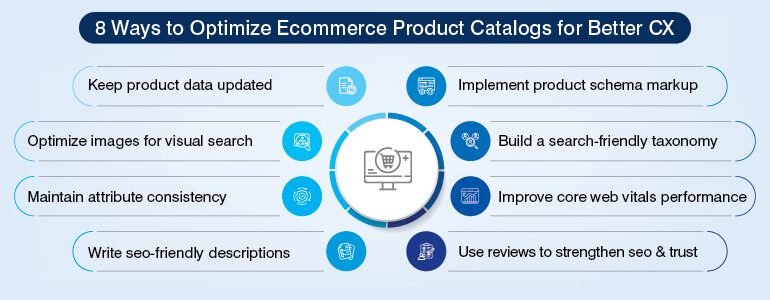
Further, we explore 8 ways to optimize ecommerce product catalogs.
8 Ways to Optimize Ecommerce Product Catalogs for Better CX
It is important to optimize ecommerce product catalog to improve CX. It improves product discoverability, filtering and overall buying experience. Optimized catalog directly impacts ecommerce CX. Explore 8 practical ways you can optimize product catalogs for better customer experiences.
1. Keep product data current or pay for it in rankings and returns
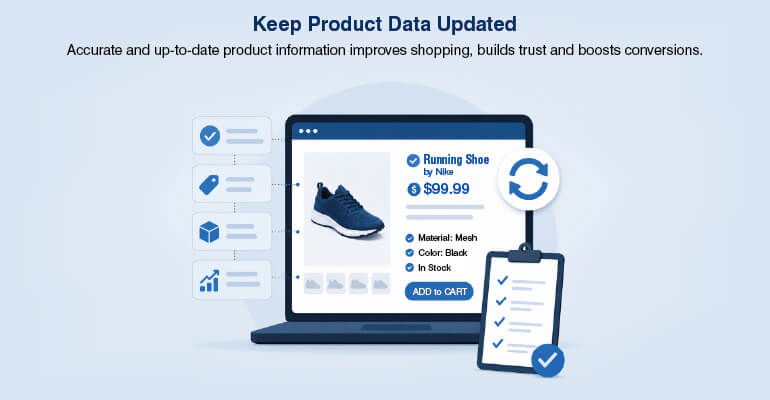
It is important to keep your data current all the time. Any discrepancy or incorrect information will impact conversions and hit your credibility.
Keeping the data current is an inventory challenge and it is also an SEO requirement. The crawl budget gets wasted when a Googlebot crawls and finds the product out of stock. This also reduces the frequency of re-indexing active pages.
The pricing mismatch between ecommerce pages can make the product disappear from shopping results without any notification. Any discrepancy in page price and Google Merchant Center feed is flagged by the google for mismatch. The listing gets immediately suppressed.
If the product is listed as available but customers can’t find it, customers start giving poor ratings, reducing CTR and lowering visibility.
It is important to keep your stock availability updated all the time across marketplaces and channels. Inventory-sync software supports keeping the stock availability updated. Also, returning a 410-status code instead of a 404 helps search engines remove outdated pages from search results faster. This improves catalog management and search efficiency.
Business impact of poor ecommerce product data
| Catalog Issue | Business Impact |
|---|---|
| Inventory inaccuracies | Poor customer trust and lost sales |
| Pricing mismatches | Product suppression in google shopping |
| Outdated stock data | Higher cart abandonment |
| Duplicate product data | Weak search relevance |
| Inconsistent attributes | Poor recommendation accuracy |
| Discontinued product pages | Crawl budget wastage |
2. Optimize product images for google lens and visual search
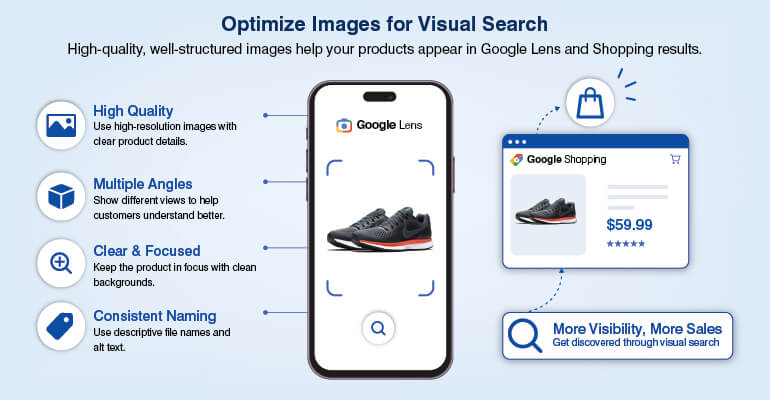
Product images are not just for aesthetic purposes. Search engines must be able to find them and for that the visual needs optimization. There is a need to invest in structured product image optimization.
People use Google Lens for 20 billion visual searches, and 20 per cent of all Lens searches are shopping related. The way you tag and name your products determines whether they appear in Google Shopping thumbnails. If your tagging is accurate, your products will appear in visual searches much faster. Your products must appear in visual searches and not just look attractive.
Improve Google Lens object recognition accuracy by using high-resolution images with clean backgrounds. Next, use a descriptive image file naming style that should include brand name, product type, key attribute, and SKU. The alt text should accurately explain the product image. Generic file names will not get you the desired result.
Format is equally important. Formats like WebP can help reduce size and improve page speed, maintaining high quality. The hero product image must be optimized because they impact Largest Contentful Paint (LCP) and Core Web Vitals.
And finally, add the ImageObject schema where you clearly specify the image dimensions that help Google to use the image in rich results. Without it, Google may index the image but won’t reliably surface it in Shopping or image packs.
3. Use a PIM to enforce attribute consistency across channels
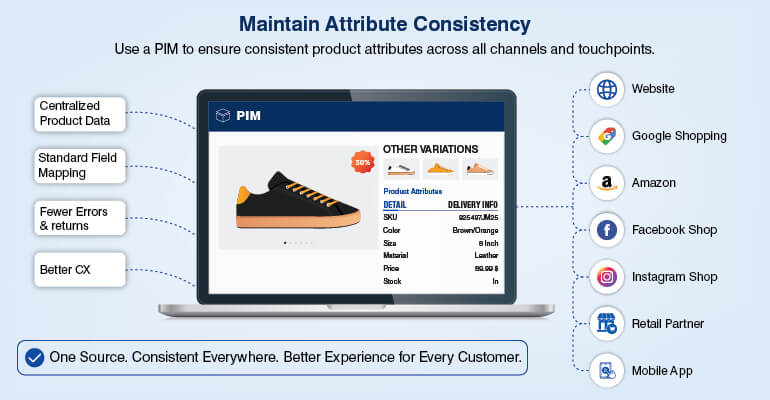
It is important to maintain a single source of truth for all product attributes across channels. Product name, dimensions, pricing, and colour should be consistent across all your platforms and websites. Using Product Information Management (PIM) system is the right way to ensure this consistency. All channels like Google Merchant Center feed, Amazon listing, and printed catalog must pull data from this centralised PIM.
Any kind of inconsistency can drastically reduce product matching accuracy and search relevance. Suppose you have a garment stored in PIM as blue colour, the product pages show it as dark blue, and your feed sends it as royal blue. This will create confusion for Google. Google will treat this as three separate signals and will not give perfect search results.
A valid GTIN (Global Trade Item Numbers) for branded products is a requirement by Google. Any GTIN mismatch between your PIM and the actual product barcode triggers a Merchant Center warning. This can suppress product visibility across product groups.
Select PIM as per your catalog scale. SMBs managing low volumes can use lightweight PIM platforms like Plytix, while those managing high SKUs require scalable platforms. They can use platforms like Akeneo or Salsify. For specialized product structures, custom-built PIM is a great idea.
Choosing the right PIM based on catalog scale
| Catalog Scale | Recommended PIM Approach | Typical Requirement |
|---|---|---|
| Under 5,000 SKUs | Lightweight PIM platforms | Basic catalog management |
| 5,000–10,000 SKUs | Mid-market PIM systems | Multi-channel synchronization |
| 10,000+ SKUs | Enterprise PIM platforms | Feed automation and governance |
| 10,000+ SKUs | Custom-built PIM solutions | Industry-specific attribute structures |
Consistent product data drives CX.
Talk to experts »4. Write product descriptions that rank and convert

Product descriptions are tricky as they must serve both the search engines and customer decision-making. A balance is a must where keywords should be balanced, and overly promotional descriptions need to be avoided.
The customer should be able to visualize the product, and for that begin descriptions with a customer-focused use case. Technical specifications like dimensions, attributes, and material must follow the emotional hook.
This kind of storytelling, followed by technical specifications, improves readability and at the same time provides informed buying information.
Apart from this, keep the keywords in place and within the limited word count. Use primary words within the first 100 characters to strengthen search indexing signals. Highlight differentiators and maintain product descriptions between 80 and 150 words. There must be a balance. Too-long descriptions don’t hold the buyer’s attention.
And lastly, keep monitoring AI-generated product descriptions to avoid repetition and ensure content uniqueness and performance. Each SKU variant should include unique attribute identifiers such as dimensions, colour, material or specifications.
The issue of cross-channel duplication is also a major risk. For example, if your product page and Amazon carry the same description, you may lose to Amazon as Amazon has more authority over product queries. Give a unique angle to your product page by writing a unique product description.
5. Implement product schema markup for rich results

Search engines need to understand product information accurately and for that Schema markups help. It keeps Google updated on attributes like name, price, availability or rating on the products. So, for any product search Google gives extra information in the search results. The information is reflected even before the user opens the website. It has been observed that rich results increase CTR by 20-30% on product queries.
Product schema markup in JSON-LD format helps search engines accurately interpret product details such as price, availability, ratings, brand, and GTIN. And to avoid any mismatch ensure that product schema data and Merchant Center feeds are in sync across all channels.
We don’t want to trigger any warnings from Google. Because any inconsistency in data can suppress product listings and may impact visibility in search results. Regular audits are important to keep a check on data consistency across product pages, feeds, and marketplace listings.
A rel=canonical tag helps avoid duplicate content issues in SEO. Use these tags for product variant URLs to point search engines toward the primary product page. These tags support high product discoverability in organic search.
6. Build a catalog taxonomy that google can crawl in three clicks
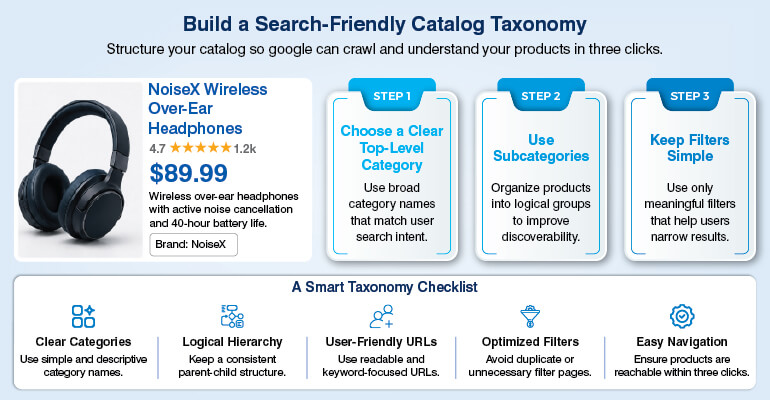
Things need to move quickly. Customers should reach the product they are looking for in just 3 clicks from the homepage. For that the catalog taxonomy should be effective. If your products are buried deep, the crawl frequency reduces impacting search. Structured catalog taxonomy improves crawl frequency and enhances product discoverability.
The hierarchy you follow must be clean and structured. Customers should be able to reach the product in a straight way starting from homepage to category, subcategory and finally the product. This helps with improved navigation and search.
Use of BreadcrumbList schema on category and product pages is a good idea as it helps search engines understand catalog hierarchy clearly. This helps users understand the product path before clicking the page.
Instead of random navigation paths build a deliberate internal linking structure across product pages, category pages, and buying guides. Strategic internal linking improves crawlability and strengthens category-level search relevance.
For large ecommerce catalogs, create separate sitemap files for different product categories and submit them through Google Search Console. This improves indexing efficiency across large SKU inventories.
Better taxonomy improves discoverability.
Improve catalog structure »7. Optimize catalog pages for core web vitals and not just mobile layout
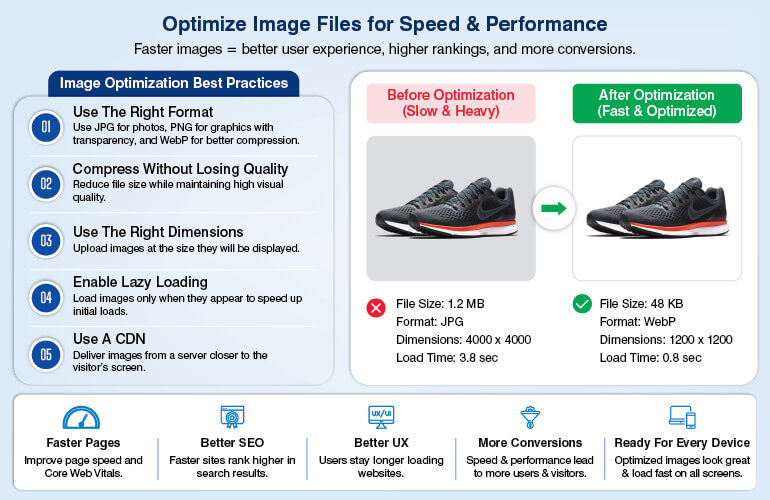
Don’t focus only on mobile-friendly layouts. For good customer experience and ranking the focus must also be on how the catalog pages perform for users. A page may look attractive but performs poorly in search because it loads slowly.
This is where Core Web Vitals become important. These metrics measure real user experience signals such as loading speed, visual stability, and responsiveness. For ecommerce catalogs, these factors directly affect bounce rates, product discoverability, and conversions.
The product images must be optimized. High-resolution images are needed that should be of correct size. Too large image can delay page rendering. Compressing images, serving them in formats like WebP, can improve loading speed noticeably.
Next customers look for stable layouts. If the product grid shifts during browsing or the buttons move during page load, then the customers get frustrated. Customer don’t tolerate any kind of interruptions. Make sure that the images are of correct dimensions creating a smooth browsing experience.
For proper crawlability just relying on infinite scroll for modern UX is not enough. Search engines need crawlable paginated URLs to discover deeper product pages efficiently. Without this structure, some products may remain poorly indexed or invisible in search results.
Core web optimization for ecommerce catalog pages
| Metric | Recommended Target | Optimization Focus |
|---|---|---|
| LCP | Under 2.5 seconds | Optimize hero product images |
| CLS | Under 0.1 | Reserve layout space |
| Mobile Performance | Fast-loading product pages | WebP and image compression |
| Crawlability | Crawlable pagination | SSR or SSG rendering |
8. Use product reviews as an SEO signal, not just a trust badge

Reviews are very important; they are not only for building trust. They also strengthen product page SEO that cannot be achieved by only product descriptions.
Google looks for original and evolving content. Product pages with only product descriptions don’t work. Genuine customer reviews add fresh, unique, and searchable content to product pages.
Reviews add contextual depth to the page that is not possible with only product descriptions. Reviews add natural language, product usage details, feature discussions and comparisons and long-tail search phrases that businesses may never think to target intentionally.
For example, if a customer gives review on the shoes he bought, that becomes real-world search patterns. When the customer writes things like, comfortable for long walks, that adds more context to the product page.
But at the same time, it is important to keep the data structured. Implementing AggregateRating schema helps search engines understand product ratings and review counts properly. The star ratings appear directly in search results improving CTR.
It is a good idea to automate post-purchase review requests for steady flow of authentic reviews. This keeps the page active and improves credibility. Reviews are no more only trust badge, they improve discoverability, strengthens engagement, and supports better ecommerce visibility.
Conclusion
Ecommerce product catalogs are no more only for information. Structured and optimized in the right way they are directly linked to search visibility, customer experience and conversions.
Optimizing ecommerce product catalogs involves multiple strategies. From accurate and consistent product information across channels, it also requires strong internal search and filtering functionality. It requires implementation of PIM, schema markup, Core Web Vitals optimization and review management.
Every single aspect of catalog optimization contributes to stronger ecommerce CX and operational efficiency. Catalog optimization is a strategic business function that improves product discoverability, strengthen customer engagement, and support long-term ecommerce growth.
FAQs
Any customer exploring ecommerce website looks to discover the product he is looking for quickly. And not only the product, but the customer also looks for the right color, fit, specifications, model and any other attribute that match the product he is looking for. That is possible only through structured and well-optimized product catalog. An optimized catalog enhances shopping experience and conversions.
Poor product data can impact customer satisfaction and shopping experience in a big way. Imagine a product catalog with inaccurate inventory, inconsistent attributes, pricing mismatch and many other such issues. This will weaken the trust, and customers would exit quick from your platform impacting conversions and revenue.
A Product Information Management (PIM) system acts as a single source of truth for all your product attributes. It helps maintain product attribute consistency across all channels and marketplaces. And a consistent product attributes builds trust and market credibility.
Product schema markup helps search engines understand the product better leading to better search results. It adds clarity on the product, like price, availability, brand information and any other information that a customer would require. With this information the search results improve driving better product visibility and CTRs.
Product reviews don’t just add credibility or trust to the product; it goes much beyond that. It adds unique and engaging content that naturally covers keywords as well. They add contextual depth to the product that is not possible just with static product description. They help pages rank better for additional search queries.
Catalog taxonomy helps with quick product discoverability. Products buried deep down requiring more than 3 clicks may frustrate the customer. This could increase the abandonment rates. Well-structured catalog taxonomy improves crawl frequency. It also enhances product discoverability, improved navigation and better shopping experience.
Most challenging part in managing large product catalogs is maintaining consistent product information across thousands of SKUs. Optimizing product description, ensuring image quality and managing multilingual and region-specific products requires expert skills. Maintaining a structured taxonomy for better navigation and quick search also requires expert intervention.
Core Web Vitals can strengthen ecommerce search visibility, load product pages faster, reduce bounce rate and improve user experience. It also supports smoother product browsing and filtering. Faster product pages improve customer trust and perceived website quality. Slow loading pages can impact visibility in a big way.
Turn catalogs into growth engines.
Connect with specialists »


Snehal Joshi , Head of Business Process Management at HabileData, leads a 500-member team of data professionals, having successfully delivered 500+ projects across B2B data aggregation, real estate, ecommerce, and manufacturing. His expertise spans data hygiene strategy, workflow automation, database management, and process optimization - making him a trusted voice on data quality and operational excellence for enterprises worldwide. 🔗Connect with Snehal on LinkedIn