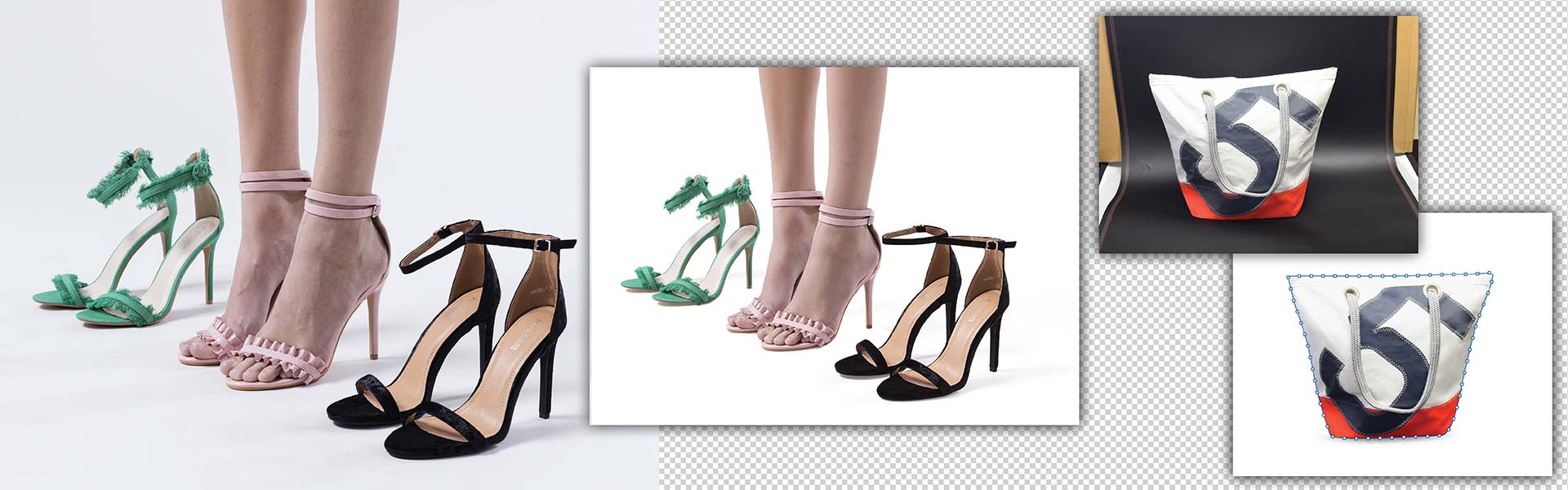
Isolating image objects with clipping paths and background removal and using cutouts and background replacements, work to create high-class product images. But you need to select the right combination of techniques to improve product image clarity, consistency and looks that draw attention.
Contents
- What is clipping path?
- What is background removal?
- What’s the difference between clipping path & background removal?
- The 10 key differences between clipping path and background removal
- When to use clipping path services
- Best use cases of background removal
- How to choose the right service for your business
- Conclusion
In the world of online commerce, visuals have become the major factor in how consumers perceive products, brands and messages. Every visual display platform (online storefronts, product catalogs, advertisements, etc.) influences both the credibility of the Brand/Store/Product as well as the confidence that a consumer will have when making a purchase based on an image.
Almost 90% of online shoppers say high-quality product images play a role in their buying decisions. Using clean, uncluttered visuals, helps the audience to focus on the actual subject at hand while also providing a sense of professionalism and clarity across all digital and print formats.
There are two methods of removing the background from an image. Clipping Path and Background Removal. While the terms may be used interchangeably, they are actually two completely separate Image Editing Methods.
The two methods are intended for very different image types, varying levels of complexity, and vastly different Output Requirements. Therefore, each will produce a very different visual outcome.
What is clipping path?
A clipping path is a vector-based, exact outline of an item made using the Pen tool within Adobe Photoshop. The clipping path is often called a Photoshop clipping path. The clipping path will be a completely closed path (outline) around the object which removes the object from its background, creating clean edges.
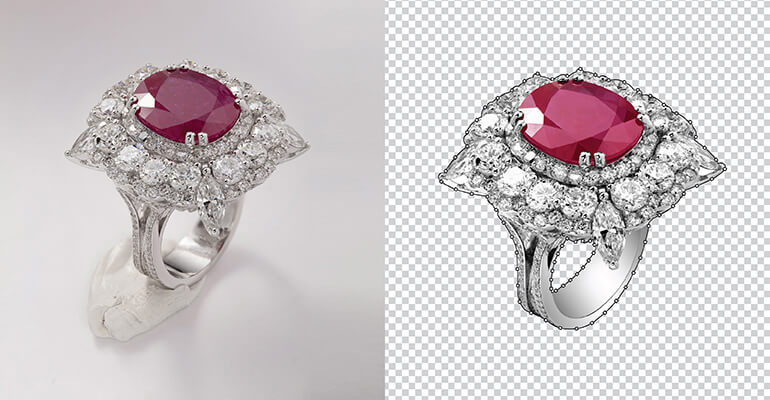
Using the clipping path, you can remove everything outside the path and replace it with anything you would like (such as a new background), make a transparent background image or use the clipping path to separate parts of an image.
Clipping paths work best with items having solid, defined edges such as electronic devices, furniture, tools, shoes, containers, etc. Since clipping paths are mathematically defined, clipping paths provide accuracy unlike other methods for separating objects. Therefore, clipping paths work perfectly for ecommerce catalog image editing, print catalogs, etc.
Advanced clipping path services (cutouts) are available today, including but not limited to; multi-path editing for color correction, creating shadows, and replacing backgrounds.
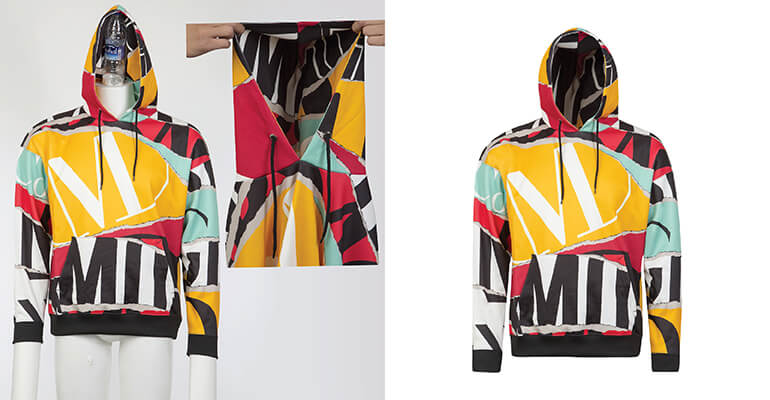
In addition, techniques such as “ghost mannequin” with a clipping path are very common in apparel product photo editing to produce images of garments looking as if they were professionally styled on a model.
Get expert clipping path and background removal services
Contact Us »What is background removal?
Background removal is an overall image manipulation method. It uses pixel-based techniques (such as image masking, layer masking, artificial intelligence selection tool and edge refinement) to remove or replace the background. The difference from using clipping paths is that this method is working directly on pixels as opposed to vectors.
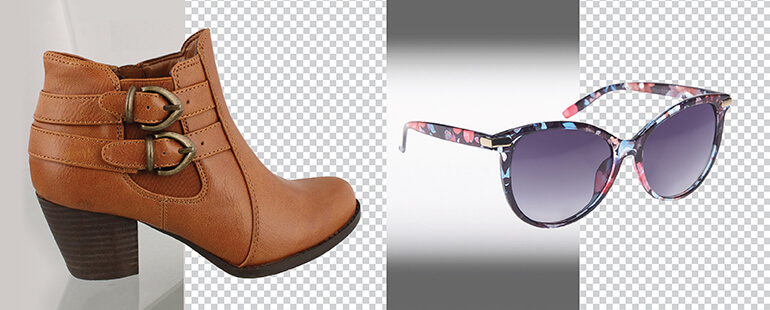
The advantage of background removal is for use with images that have many irregularities in their edges or are in a transitional state, such as hair, fur, fabrics, shadow, smoke, and/or semi-transparent objects such as glass.
When background removal is applied, the editor can keep the detail in the original object and make a natural transition into the new background.
A lot of the time background removal is used in product photo editing (fashion, lifestyle, cosmetic and promotional) when it is more important to create realistic transitions then clean crisp lines.
Also, background removal can be used creatively to add a background to banners, advertisements, and brand specific images.
What’s the difference between clipping path & background removal?
Clipping Paths and Background Removal both serve one purpose: to isolate your product from its background. And the finished product typically is going to look like a product sitting on a white or transparent background so it’s no surprise that many businesses will refer to these as interchangeable terms.
But what really separates them is how they edit and how much of the detail they preserve. If you apply the wrong technique to a product image you could be left with a product image with jagged lines, an unnatural cutout line, or loss of detail which could have a negative effect on conversions and affect how customers perceive your brand.
The 10 key differences between clipping path and background removal
Understanding the difference between clipping path and background removal will allow Businesses and Creative Teams to choose the correct method for their particular needs – ultimately leading to consistent Images, streamlined Editing Workflows and the maximum Return on Investment with regards to Visual Content.
Below are the 10 key differences between clipping path and background removal to assist you in determining the best method for your images and uses cases.
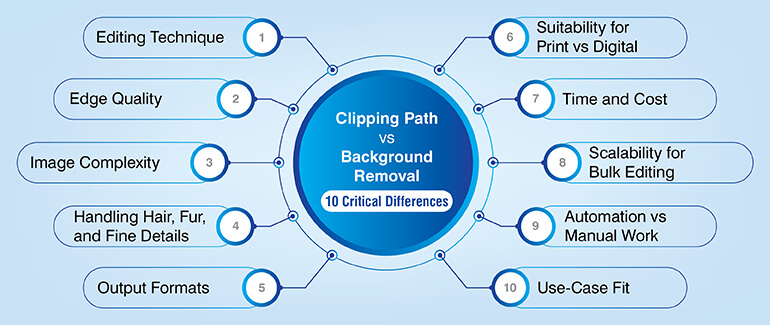
1. Editing technique and level of control
Clipping Path is a manual, vector technique created using the Photoshop clipping path tool. Using the clipping path tool to manually outline an object (product) gives you complete control over how close the edge is to the actual product.
This technique has been used for years and is very structured and repeatable.
Background Removal uses a combination of pixel-based methods, including image masking, layer masks, and AI-automated selections.
Rather than drawing a line around the subject, pixel-based techniques analyze individual pixels to determine where the subject ends and the background begins.
For Your Business:
- Clipping Path provides consistency for editing ecommerce catalogs
- Background Removal provides flexibility for editing different types of images
2. Edge quality: Precision vs natural transitions
Clipping Paths provide sharp, defined edges which work well for objects with defined boundaries. When combined with a professional layout, the end result looks clean, professional and ideal for creating structure.
Background Removal allows for soft edges and transitions between objects and backgrounds. Even though the transition may be subtle, the final image will appear natural and authentic. Soft transitions and transparent images are easier to mask and refine using pixel-based methods.
When choosing a workflow based on edge characteristics:
- Clipping Path: Electronics, Furniture, Tools, Footwear
- Background Removal: Fashion, Beauty, Lifestyle Images
Natural shadows and transparency are better handled using masking techniques.
3. Image complexity and shape handling
Clipping Paths perform at their best when working with images containing simple to moderately complex shapes. However, as the number of layers or shape complexity increases, the vector outline will begin to degrade.
Background Removal performs better with complex images, including those with irregularly shaped edges, layers of elements or texture. It also works well with subjects that have uneven or multi-colored textures.
Why does this matter for product photo editing
- Simple products benefit from vector accuracy
- More complex visuals require refining pixels for the best results
- Selecting the right method prevents jarring edges and unnatural cut-outs
4. Handling Hair, Fur, and Fine Details
Clipping Paths are not designed to capture fine strands of hair, fur, or intricate textures. Vector lines cannot accurately follow the micro detail in fine hair, fur, etc.
Background removal uses image masking and edge refinement to preserve fine detail and natural transparencies.
Recommended Use Cases:
- Clipping Path: Solid Products with clean borders
- Background Removal: People, apparel, pets, textured fabrics
Crucial to authentic Photo Editing for Product Images.
5. Transparency and Background Replacement Options
Clipping path gives you a fully transparent background to put your item on white, black, or any other color background (or even a texture).
Background removal is an easy way to remove the background of your images and replace it with anything you want, like a photo studio setting or a gradient.
Real-world practical applications:
- Clipping path is great for making sure all of your products look the same in your catalog, and for keeping your brand consistent across different product pages
- Background removal lets you create creative marketing materials such as GIFs, animations, etc
Both clipping path and background removal have their own places in the world of e-commerce image editing.
Improve your product images with professional editing
Talk to Our Experts »6. Output Formats and Editing Flexibility
The file types delivered after clipping path are usually PSD, TIFF, PNG, and JPEG, depending on the requirements of the project and how they will be edited.
Background removal usually includes layered PSDs or high-quality PNGs with soft edge and mask layers.
How does this affect you?
- You can reuse vector paths over many different designs and layouts
- Files with masks give designers creative freedom to experiment with their designs without having to recreate them every time
File format affects both your design workflow and your publishing workflow
7. Print Readiness vs Digital Optimization
A clipping path is very common for print catalogs, brochures, and packaging, since print reproduction is better when there are hard lines and no blur, so clipping path creates those hard lines.
Background removal is ideal for digital platforms because realistic, visually rich images increase user engagement.
Which platform do you need?
- If you are primarily a print-based business, then clipping path would probably be your best bet
- If you are primarily a digital business, then background removal would likely be your best option
This helps ensure that your visual content looks consistent across all platforms.
8. Speed, Cost, and Scalability
Time-consuming and expensive due to its reliance on skilled, manual labor, clipping path has significant limitations regarding speed for complex product images; however, it scales well with similar products.
Background removal uses artificial intelligence to automate much of the process, greatly improving the turn-around time and cost for large volumes of images.
Business implications:
- Clipping path is ideal for standardized catalogs
- Background removal is ideal for large volumes of mixed imagery
Ultimately, your cost efficiency is dependent upon what type of images you are processing.
9. Automation vs Manual Control
Completely reliant on human expertise for accuracy, clipping path produces predictable results. Background removal combines automated processes with human refinement, providing a balance between speed and quality.
Important takeaway:
- Human control provides accuracy
- Automated processes provide faster turn-around times
- Ideal business models combine both manual control and automation for scalability
10. Use-Case Alignment and Industry Fit
Clipping path is best suited for product-based images (e.g., electronics, jewelry, furniture) that require the highest level of precision and consistency.
Background removal is best suited for creative, lifestyle, and branding related images (e.g., fashion, cosmetics, lifestyle campaigns) where the objective is to drive engagement through the appearance of realism.
Examples of typical use-cases:
- Clipping path: electronics, jewelry, furniture, ghost mannequin with clipping path
- Background removal: fashion, cosmetics, lifestyle campaigns
Using both clipping path and background removal together will help deliver your best possible visual strategy.
When to use clipping path services
Use of a clipping service is best suited for those businesses requiring high levels of precision, consistency and clarity in their images.
Businesses that maintain extensive product catalogs with a number of items with similar characteristics (for example, electronics, jewelry, furniture or tools) will see an improvement in visual consistency when using a clipping path for each item to be displayed on various marketplace platforms.
A clipping path is particularly beneficial for ecommerce catalog editing, preparing print-ready files and apparel workflows that include ghost mannequins and a clipping path in order to establish a level of precision that ultimately establishes the overall image quality.
Best use cases of background removal
Background removal works best in cases where there are complex edges and soft detail or natural textures that require a realistic finish. It is designed to preserve fine details while creating smooth transitions between the subject and new Background.
This technique is ideal for:
- Fashion and apparel images with fabric textures, folds, or layers
- Lifestyle photography that include people, hair, or organic shapes
Beauty and cosmetic products that require soft shadows and subtle highlights
This technique is also very effective for banners, advertisements and web visuals where realism is key to engagement.
Why Background removal delivers better results than other techniques:
- It preserves natural shadows and soft edges
- It handles hair, fabric and transparent elements accurately
- It allows for creative Background replacement without harsh cutouts
- It produces visually appealing images that feel authentic and polished
How to choose the right service for your business
Your business may use either clipping path or background removal depending upon whether it is a real world image (background removal), an illustration (clipping path) or what type of products you sell; as well as how images are used in your business. Here is a quick decision matrix for Clipping path vs Background removal.
| Decision Factor | Choose Clipping Path | Choose Background Removal |
|---|---|---|
| Edge Type | Hard, clean, well-defined edges | Soft, uneven, or organic edges |
| Image Complexity | Simple to moderately complex products | Highly complex subjects with fine details |
| Fine Details (Hair, Fur, Fabric) | Not suitable | Best choice using image masking |
| Output Requirement | Clean cutouts and transparent background images | Realistic visuals with soft transitions |
| Primary Use | Product catalogs, print layouts, structured visuals | Ads, banners, lifestyle, and branding visuals |
| Consistency Across Images | High consistency for large image sets | Better for mixed or creative image sets |
| Background Replacement Needs | Solid or uniform backgrounds | Creative or contextual background replacement |
| Industry Fit | Electronics, jewelry, furniture, tools, packaging | Fashion, beauty, lifestyle, corporate portraits |
| Workflow Preference | Manual precision and repeatability | AI-assisted speed with human refinement |
| Specialized Use Cases | Ghost mannequin with clipping path | Hair masking, shadow retention, realism |
HabileData provides businesses with solutions that work best for their needs and scales them through consistent, scalable and cost-effective image editing services.
Conclusion
Knowing the difference of a clipping path compared to removing a background will help you develop more effective visuals, build more trust with customers and get more sales. Both techniques are used for different functions and when applied correctly, both enhance your company’s image quality.
Learn about HabileData’s professional photo editing service so you can turn your product images into powerful visual tools to grow your business.
Partner with our specialists to achieve visually compelling images
Let’s Get Started »

Snehal Joshi , Head of Business Process Management at HabileData, leads a 500-member team of data professionals, having successfully delivered 500+ projects across B2B data aggregation, real estate, ecommerce, and manufacturing. His expertise spans data hygiene strategy, workflow automation, database management, and process optimization - making him a trusted voice on data quality and operational excellence for enterprises worldwide. 🔗Connect with Snehal on LinkedIn